Whelp. I’m finally coming up for air. This past week has seen the world change forever in my neck of the woods and probably yours too. You maybe are even a week or more into it. Fortunately I was a bit ahead of myself in my coursework – but I know that I haven’t even looked at other blog posts from last week yet. Now that we are no longer in class, I will have a bit of time to sit down and catch up.
Everything that I have written below in black font, was written in the world before. Now, as we in Manitoba enter this new world, my coursework seems to be even more important and relevant. How do I teach students to do these things from a distance, with no consistent technological access? Stay tuned.
Keep calm, wash your hands and stay at home, friends.
Last week, I set up a beginning outline for my final vision assignment. The project would be posted using Adobe Spark Page, and would be a digital trove of information on Digital Storytelling. I envision it as a website/article hybrid. This project would be designed mainly as a resource for teachers who don’t know where to start with digital storytelling in the classroom. The outline is tentatively as follows,
1) What is digital storytelling?
2) Why you should be doing it.
3) A step by step guide – featuring a digital story how-to video made with the Adobe Creative Cloud.
4) Lists of helpful apps and programs.
5) ‘Tips and Tricks’ videos.
6) Some sample project ideas.
7) Useful handouts for students.
8) Some examples of digital storytelling projects.
It’s funny how the human brain works. Until I sat down and looked at this week’s question, I had never really thought of framing this project in any way other than at other teachers. It is interesting to me that my brain went so automatically to something aimed at educators rather than students. There probably is a definite need for resources on digital storytelling for students, in student friendly language. In many ways the best learning is that which is self-motivated.
I was reminded of this on Sunday, driving while listening to the program Tapestry on CBC Radio. Frank Kadillac, the Juno nominated singer of pop duo Neon Dreams, was being interviewed. I was struck listening to Frank as he talked about falling in love with the guitar as a kid – wanting one so badly that he drew out a paper fret board and strings on four sheets of paper and practiced playing chords and songs from tabs that he found on the internet. This kid took a marker and the internet and turned it into a career. I want to help kids do that.
This video seems appropriate for the times in which we are living.
But, then I am torn by the knowledge that frequently the teacher is the person who makes project decisions in the classroom, and so I need to make them more likely to buy into this as an option. And what is it that makes some of our staff such reluctant technology integrators? Factors that get in the way of teacher usage of technology have been reported to include things like “negative attitudes towards computers, technology incompetence, passive school support policy, different pedagogical beliefs and limited access to technology tools” (Chen et al, 2019). Another study concluded that beliefs about what makes a “good” education needs to be a part of any professional development for teachers (Tondeur et al, 2016). My main audience are the teachers who are less likely to use technology in innovative ways with their classes.
I feel like there might be an overlap between use of technology and love of Comic Sans.
To counter this, I am going to include rationale in my project, connecting Digital Storytelling to 21st century skills to help tie this to modern knowledge about what constitutes a good education. To help with feelings of technological incompetence and negative attitudes towards computers, I will provide step by step instructions and offer to join teachers as a co-teacher when they are providing Digital Storytelling opportunities to their class, or run smaller sessions where I completely take the lead. I hope that this project will work towards providing support to teachers, alleviating feelings of a lack of support from the school. To ward off limited access issues, I have planned to teach basics using operating systems and programs that we have access through our division and/or that are available across different platforms.
Why was I so set on planning this for educators? Ultimately, I do see my main audience as being teachers. However, I want many of the materials (especially videos) to be accessible to a student audience. They should be able to be used by educators as part of the digital storytelling experience in their classrooms. This is important for me to consider as I continue storyboarding and planning over the coming week – this project will hopefully create a grab-and-go kit for teachers to use with their students. While teachers are my main audience, I must keep students in mind.
Here is a first draft of a digital storytelling exemplar that I have put together for my Final Vision Project. The goal is to have materials that will engage students, as well as teachers. I learned some important things from this – especially the importance of a good microphone. Also it is missing the last 30 seconds. Better luck next time, I guess.
Chen, M., Zhou, C., Meng, C. et al. How to promote Chinese primary and secondary school teachers to use ICT to develop high-quality teaching activities. Education Tech Research Dev 67, 1593–1611 (2019). https://doi-org.ezproxy.library.ubc.ca/10.1007/s11423-019-09677-0
Tondeur, J., van Braak, J., Ertmer, P.A. et al. Understanding the relationship between teachers’ pedagogical beliefs and technology use in education: a systematic review of qualitative evidence. Education Tech Research Dev 65, 555–575 (2017). https://doi-org.ezproxy.library.ubc.ca/10.1007/s11423-016-9481-2
This week’s assignment has left me feeling a tad overwhelmed. At the start of the course, I focused on Digital Storytelling, which you can read more about in posts here (in which I narrow down my topics of interest), here (in which I find pertinent resources) and here (in which I ruminate on what I found and didn’t find). At the end of Reading Review 3, I bemoaned the fact that while I could find lots of information out there for the who, what, when, where and why of digital storytelling; I felt like there needed to be a how.
Actual footage of me overthinking.
And so, I’m thinking that a how-to is the next step. But what exactly am I how-to-ing? A key idea about Digital Storytelling is that it’s anything that contains digital multimodalities to create meaning – this could be countless things. What format do I choose then?
Another issue that has caused me some grief is that I want this project to somehow create connections between people, ideally on a global level. Simply putting something out there on the internet doesn’t mean others are going to engage with it at all. And this project might rely on technologies that are out of reach for many around the globe. How do I reconcile myself with these issues? I do not have an answer to this question.
How I feel when my planned projects don’t align with my values.
Potential final project ideas or parts
After some brainstorming, I had several potential options:
– Create a digital video using Adobe Premiere Pro explaining the how-to process for creating a digital story. This would take viewers through the steps of planning and creating a digital story through my story of completing this course.
– Use Adobe Spark Page to create an interactive how-to guide, less focused on video created by myself and instead linking to content created by others, but still working through the process and tips for digital storytelling.
– Same as above but use Microsoft Sway.
– Create a green screen tutorial to share with students and staff.
– Create a sample student project, complete with an example, outline and important resources.
– Some combination of the above, most likely an interactive digital how-to-guide with examples and including a resource collection of important materials and documents to provide for students during the planning phase, and apps that they might use during creation.
I think I’m leaning towards the last example, with a combination of video created by myself, and linked resources from others. Because there is so much to do for this project, I probably won’t use Premiere Pro, but will instead use Spark Video, which seems like it has a much gentler learning curve. It also has fewer features, but I feel like going all out might be a bit overwhelming for students and staff anyway.
We do have a Mac in the library that I could use for video editing, but 99% of the computers in the school run on Microsoft, so it makes sense to use the OS that the majority of students can access. All Grade 7 students in the division have just received access to many Adobe Creative Cloud programs, so it makes sense to use these resources. These can also be accessed from the small set of iPads that we have in the library, so it is accessible even on different operating systems. This work could also be done on student owned devices.
Alright, but what’s the plan, Stan?
Right now, my planned outline looks like the following, which will be ultimately hosted using Adobe Spark Page, and featuring embedded videos and content.
1) What is digital storytelling?
2) Why you should be doing it.
3) A step by step guide – featuring self made video edited using Spark Video.
In my last week’s blog post, a reflection on our inquiry posts of the previous four weeks that you can see here I observed that the thread that wove our research together has been connection. I think in many ways, this project will serve this purpose. Students will be connected to important literacies that they are going to need in the future. Digital, technological, visual and information literacies are all readily apparent in the digital storytelling process through student use of cameras, production software, collecting appropriate multimedia, and the use of these things to create a more profound meaning. Students will also be connected to important skills like researching, writing, organization, technology, presentation, interviewing, interpersonal, problem solving and assessment.
Recently, I was fortunate enough to take a day’s Professional Development with Garfield Gini-Newman, and it focused heavily on the importance of creating rich learning tasks that don’t necessarily have a correct answer. I think that digital storytelling is just that; a truly rich learning task that will “challenge them to think and allow them to deepen their understanding over a period of time” (Newman & Case, 2018, p. 218). We can’t tell someone that their story is wrong, we can only suggest strategies to strengthen its telling. This will also hopefully give students the ability to connect what they are learning to themselves personally.
If you haven’t, I would recommend checking out this great educational read on risk learning tasks.
When I am complete, I hope this project will connect teachers to the resources they need to start storytelling in their classrooms and give them the skills necessary to expand beyond the walls of their classrooms. I hope that it will also remind them of all the great Creative Commons resources that are available for use in multimedia projects.
Sources
Gini-Newman, G., & Case, R. (2018). Creating thinking classrooms : leading educational change for this century. A Sage Company.
Cerebrating on these last few weeks (yes, sometimes I do use the thesaurus), the word connection is the one that comes to mind the most, although you could argue that listening fits just as well. Library patrons, both locally and globally need to be connected and listened to in our spaces.
This video was created by a corporation that profits on libraries, but the message is a great one.
It’s important for students to feel connected to the library; if it is not a warm and accepting space we’ll never get students through the door. We connect with them both in our everyday interactions, where they know they can ask us for help or for a personalized book recommendation, and through social media, where I post literary memes and hype new books. I feel as if school libraries are taking a page out of the public library playbook and opening up our spaces to be community connection points, rather than simply academic study spaces.
Students need to be connected to the books that they choose to read, rather than being assigned them by a leveling system (that is arguably arbitrary). Some of the events that most help create a culture of reading are those that bring about genuine connections with others – at a micro level, things like classroom book clubs or buddy reading between classes, but in macro terms, world-wide events like the Global Read Aloud. Being able to connect with the thoughts and opinions of other readers through apps and services like Goodreads give us the ability to connect with stories and ideas that would have been unimaginable even twenty years ago. We also need to be able to connect students to resources that exist both inside and outside of the library walls – whether digital, or through connections with the public library system. More and more we see that our clients (students and staff) need to be able to make connections between themselves and the characters of the books they are reading – culturally relevant texts and learning materials are integral to creating a culture of reading.
Books can connect you to your passions.
When it comes to my own personal development, the need for connections continues. No learning is done in isolation. In order to learn we must live in a community (physical or digital) that allows us to interact with the thoughts, words, images and ideas of others. These shared connections are what truly makes all learning possible. Through my research for this course, as well as the wonderful suggestions of my peers, I can connect through local organizations, or international ones like ISTE. Twitter, Facebook and blogging platforms both offer free options (if you consider the gathering of your personal data worthless) for personal Professional Development and the ability to connect with other Teacher-Librarians throughout the world. Without other individuals to connect and share with, we would be limited to our own innovations – but it’s the connections and collaborations that allow new ideas to flourish and problems to be solved.
Actual footage of professional learning. Just kidding, it’s a nice gif though,.
As Teacher-Librarians, the first step to sharing our learning with others is by connecting with our peers and getting to know them as individuals. Being adaptable and flexible is necessary, because people are more likely to engage with something that they see as having a connection to them personally. We need to make connections between what we learn during our own professional learning and what will be useful/relevant to the teachers we work with. We need to make time to connectwith these people to share, and we need to connect with them at a level that meets their level of skill and interest. In my experience, the best PD opportunities have been the ones that have allowed teachers to connect with each other and share their ideas and experiences with one another. Connecting over food came up countless times while I was reading through other blog posts. There are so many more options for ways to connect with people, whether through collaboration, lunch and learns, book studies, ed camps, or PLNs. It is only through connections that relationships are possible, and these relationships are the best way to create a collaborative work environment.
When looking at global libraries, especially in areas home to marginalized populations, connections again resurface as a recurring theme. It is especially important that we connect with individuals in these communities when creating solutions – we don’t simply want to pass off our problems (weeded books, for example) and end up creating unintended economic consequences for parts of the world that are already struggling. We are all connected, and ultimately what negatively impacts one of us, negatively impacts all of us. Modern technology has made it possible for us to connect and interact with people half a world away from us, and to benefit from and hear their solutions to their local issues. It is the issue of connection that struck me the most in my study of the issues faced by libraries in the developing world. These libraries, just like our own, are connecting spaces for their communities, and they are frequently the best sources of internet connections in their communities. Instead of relying on dated texts as information sources, these libraries want access to high quality digital resources. These resources would leave these communities connected to the world, rather than at the whims of our leftovers.
Mobile technology has changed the way that the world connects and has opened the doors of literacy wide open. Before this week, I had never thought about how mobile phones were a gateway to literacy – I took for granted that people could access books, and I minimized the impact that multi-use devices could have on female literacy. But mobile phones are a multi-purpose device, and they connect people to a world of information, including stories to read to their children.
I think that we often focus on the negatives of mobile technology (especially related to distractions), without thinking of the empowerment and personal agency they provide for those who are less privileged.
While reading my way through feedly, I was able to find a wide range of global initiatives that work to connect libraries across the globe to important information. I was struck particularly by Melissa Hunt’s post, which alerted me to the existence of Electronic Information for Libraries (EIFL). It is a global organization that connects librarians around the world to technology and information. I was especially struck by their website because the site was truly accessible and would not require top of the line devices to access it – the website offers a text only option that would make access possible on older models of cell phones, or older web browsers. This accessibility makes connection a possibility for all. They also connect users to Free and Open Source Software, along with other important topics for library development.
EIFL is a global non-profit connecting librarians to the resources they need.
I think this process has only served to strengthen my interest in digital storytelling. I see it as a great way for us to tell our stories, and to connect with others. Despite differences of access to resources, libraries are connected by a common goal. The same goes for people as well. There is power in story as a tool of connection. I will be mindful of this as I move on to the next stage of this course and begin to work on my vision of the future assignment. I want to create something that will help teachers and students connect with new technologies and connect with one another.
Ultimately I think, Libraries are a place of ubuntu; to borrow from Archbishop Desmond Tutu. We realize our interconnections and support others in accessing what the world has to offer. This vision is what I want to bring to our future.
“Ubuntu is very difficult to render into a Western language. It speaks of the very essence of being human. When we want to give high praise to someone we say, ‘Yu, u nobunto’; ‘Hey so-and-so hasubuntu.’ Then you are generous, you are hospitable, you are friendly and caring and compassionate. You share what you have. It is to say, ‘My humanity is inextricably bound up in yours.’ We belong in a bundle of life.”
Tutu, D. (2000). No Future Without Forgiveness. New York, NY: Image/Doubleday.
When I first sat and pondered this week’s blog topic, I was reminded of the ‘charitable’ practice of donating used clothing. According to this 2018 CBC News article, 80–90 percent of clothing donated in Canada isn’t being resold here. Some is cut into rags, others ground down into upholstery filler, but the majority is packaged up to the developing world where it is sold. The issue with this is that this is the end of the line of the re-use cycle, as once they end up in these countries the clothing will inevitably end up in a landfill. Another issue is that these donations and second-hand goods end up suppressing the textile industries in these countries – industries that would offer citizens good paying jobs and the promise of economic development (Jay, 2018). Thus, these donations end up empowering the developed world (the United States economy is benefitted over $680 million each year from used clothing exports) while the economies of importers get access to cheap clothing, but at a developmental impact. Several decades ago, almost half a million Kenyans worked in the garment industry – in 2017, only approximately 20,000 of those jobs remained (Harden, 2019).
Weeded donations – good deed, or pushing garbage onto others?
Are book donations from the developed world similar? Are they just another way for those of us here to feel good about ourselves and get rid of items that we don’t want any more anyway? Are we just assuaging our privileged guilt?
I think the answer might be yes, at least a little bit. In a world before internet access and mobile devices, an old book very well might have been better than no book at all. And when the option is between nothing and something – yeah, I’d generally take something. However, my research on this week’s topic tells me that librarians in the developing world don’t see donated books as being key to their development and growth. Mose and Kaschula researched the impact of donated books from Book Aid International on primary school literacy levels in Kenya. It should be noted that these donated books were not weeded copies from libraries, but rather from using fundraised monies to purchase new books from publishing companies. Their report showed that students showed a definite improvement in literacy levels, and an increased level of enthusiasm for reading. (Hooray!) However, the authors noted that the donated books were often not relevant culturally to the readers, and went on to explain:
Rudman (1988) states that ethnic groups need to see themselves reflected in literature and that their portrayal should be well developed and offer a multi-faceted view of their heritage; this is not the case in a majority of the books donated by BAI and supplied to schools by KNLS. Rudman further indicates that individuals who develop an appreciation for their own diversity are more likely to value others.
(Mose & Kaschula, 2019, p. 396)
Perhaps our support would be better used to assist developed nations to create, write and publish culturally relevant materials of their own. Mobile and internet technology is key to this transformation. This assistance would provide untold economic development to the nations where it occurs.
It should also be noted that it is significantly more likely that a discarded book will be recycled in the developed world. By sending our unwanted books to other countries, we are also increasing the likelihood that they will end up in a landfill.
What’s being done
Access to digital resources and community building were themes frequently revisited in my research this week. Tilahun Shiferaw, a librarian at the Haramaya University Library in Ethiopia referred to his library as a space to enable innovation, have cultural meetings and create community hubs (Ray, 2019, p.14). While half a world away, these words sound like they could be coming out of the mouths of any of us in this program. Shiferaw’s own research focuses heavily on digital methods – database management, digital knowledge base systems, digitization and system administration, as well as community service and research (Ray, 2019, p.14).
Several thousand miles away from Ethiopia, in the West African nation of Ghana, Dinah Baidoo says that the greatest prohibitive factor in her university library is the extreme cost of subscribing to electronic resources (Baidoo, 2017). This sounds like something I would say. If donations are needed from the developed world, maybe access to these electronic resources would be a better option? Some academic publishers are already offering free or reduced-price access to institutions in the developing world, like Sage Publishing’s Public Private Partnerships.
Barriers for school libraries
In “A Consolidation of Challenges Faced by School Libraries in Developing Countries” Liah Shonhe from the University of Botswana completed a literature review on issues facing school libraries specifically (2019). Educational policy, staffing, funds, and inadequate facilities for maintaining physical connections were commonly reported issues across nations in Africa and South-East Asia. The review contains a long list of policy changes and recommendations, including the importance of collaboration between school and public libraries, but I was particularly struck by the following:
Developing countries should consider embracing technology and fast track-rural network connection. This will ensure that school libraries provide access to the internet and up-to date information to students.
(Shonhe, 2019, p. 9)
The role of mobile devices
In a 2014 article by United Nations University, United Nations data indicates that 6 billion of the world’s population now has access to a working mobile phone (only 4.5 billion have access to a toilet, for perspective).
This 4:04 video discusses changes to reading across the world in the mobile era.
While these may not be complex smart phones, they feature rudimentary screens that allow people to read text, and even books. Studying the use of these devices in seven developing countries (Ethiopia, Ghana, India, Nigeria, Pakistan, Uganda and Zimbabwe) approximately one in three stated that they used their mobile phones to read to their children. Mobile readers are heavily skewed female, with women reporting 277 minutes per month, while men average 33 minutes. This bodes well for development of female literacy, given that a disproportionate amount of the world’s population that is considered illiterate is female (64%). Mobile reading is inexpensive and allows reading to take place despite social stigma around female education. (Smith, 2014).
Data collected by United Nations University shows a significant increase in positive attitudes around reading after having access to a mobile phone.
Mobile devices allow for access to multiple modalities of text, including e-books, audiobooks, and built in translation and dictionary tools. They can be accessed at any time, from remote locations, they are incredibly mobile and they make text accessible for many. For an increasing subsection of the global population, mobile devices are what makes literacy possible.
Accessacross a range of mobile devices
As mobile devices continue to evolve, one thing that will need to be kept in mind (globally, not just in the developing world) is accessibility. In a 2017 article entitled “We went mobile! (Or did we?)”, Laura Turner and Alejandra Nann discuss what makes mobile based web experiences optimal. For their research, they used the following 4 criteria:
1. It uses mobile friendly software.
2. It does not require the viewer to zoom and can be read from the page’s initial loading.
3. The viewer does not have to scroll horizontally.
4. Links are easily clicked on. (Turner & Nann, 2016, p. 216)
Barriers to accessibility included having to download an app, download PDF files, or use Flash. Web browser-based solutions were deemed most accessible. This takes me to my final point.
Innovative ideas from the global community
So… we want materials to be culturally relevant and in their mother tongues, up to date, and easily accessible. What is being done in edtech in these areas?
This video, aimed at families in India, goes over the benefits and uses for Worldreader
My research led me to Worldreader, a global non-profit charity that only works in digital publications. Through web-browser based e-reader technology, which can be accessed at read.worldreader.org, students have access to free e-books. All these books can be downloaded on to your device to read offline (a great feature for places in the world with spotty access to mobile data or internet). The browser-based app includes awards and motivators for reading, allows readers to set goals, read in multiple languages and increase font size.
This advertisement, in Hindi, highlights the lessons that we can learn through story.
In partnership with the Bill and Melinda Gates Foundation, Worldreader studied the impact of the e-readers in libraries in Kenya. More than 80% of participants reported reading more, 254 community events were held, 20000 people were trained to use the e-readers, and library visits at pilot sites tripled. You can read more about the effects of Project LEAP here.
This screenshot shows a view of English book options in the Worldreader catalog
I appreciate that their financials are available for all to check out on their website – something I find very important. Also, using the four criterial from the Turner and Nann study on mobile-friendly technology, Worldreader provides an optimal web-based experience. Finally, upon browsing titles I was struck by the diversity of characters, settings and topics. Non-fiction texts about women and technology, and crime thrillers and other fiction set from Ghana to Cambodia can be found on the site. To see oneself reflected in what you read, see and hear is so very important.
When children cannot find themselves reflected in the books they read, or when the images they see are distorted, negative, or laughable, they learn a powerful lesson about how they are devalued in the society of which they are apart.
(Bishop, 1990)
This is only one innovative idea that I found. https://libraryforall.org/ is another non-profit that seems to be working along the same principles. It operates via its own app, rather than an in-browser option, which makes it slightly less accessible.
I’m excited to see the other gamechangers that exist in the world of mobile technology that my classmates will suggest!
Turner, L. S., & Nann, A. (2017). We went mobile! (or did we?) reviewing and promoting third-party device neutral library resources. The Serials Librarian, 72(1-4), 214-222. doi:10.1080/0361526X.2017.1297594
UNESCO. [UNESCO]. (2014, April 22). Reading in the Mobile Era [Video file]. Retrieved from https://youtu.be/4gOtpCIl-Ng
Worldreader. [Worldreader]. (2016, September 21). Readtokids.com [Video file]. Retrieved from https://youtu.be/CUicPi3QQOY
Worldreader. [Worldreader]. (2018, November 19). Worldreader Kids – English [Video file]. Retrieved from https://youtu.be/JmwnhFF-kCY
– or, we can lead horses to water, but how do we encourage them to drink?
Alternate title – if we build it, they will come?
I just finished reading Todd Rose’s The End of Average this week. Rose, a professor at Harvard and a student who barely made it through high school, discusses how the concept of average people and standards came to be. Ultimately, he argues that although this view has played a crucial role in creating the world that we live in, it is time for us to look for other ways to reach, educate, and employ the world around us. He describes how many of the ‘benchmarks’ of development that we have been taught to look for don’t so much tell us about normal development, but rather provides information about the environment someone was raised in (Rose, 2016, pp. 127-128), and that there are many ways to go from point A to point B. It wasn’t surprising when he went on to explain that even a concept like honesty is something that is context dependent.
Rose uses if-then signatures to map the context dependence of a concepts and behaviours.
When I was but a young T-L to be, I remember sitting in on an IEP meeting at which the student’s profile was referred to as a deficit based ‘Sawtooth’ profile. Some years later it’s clear to me that we are all, each and everyone of us, a sawtooth profile. We have strengths and gaps, just like very person does. Teaching students (and ourselves) how to leverage these strengths to develop others is one of the necessities of modern education.
Now, you might be wondering what on Creator’s great earth is Morgan getting at here – but I promise that I have a point. There is no one-sized fits all approach to professional development, just as there is no one size-fits all approach to education in general. In assuming there is, we limit the achievement potential of those around us.
So, how do we reach all people without burning ourselves out?
Get to know people and what will engage them
Observe, observe, observe. In the first class I took as part of my journey to become a trained Teacher-Librarian, we read New on the Job and I was struck by the chapter on ‘Clientele’. While the chapter was focused on collaboration, I think that it has tendrils that hook into professional development. The discussion of Gregorc’s Mind Styles Model strikes me as important to this discussion. Gregorc sorted people into four combinations of perceptual and ordering ability. (It is important to note that he did not think that anyone was a “pure” version of each style, but rather that we exist on a continuum of these traits). Concrete Sequential teachers are highly focused and often do best with brief projects. Abstract Sequential teachers are big picture thinkers who would do well with PD based on large topics. Concrete Random teachers are those who are most likely to try something completely new and out of left field. Finally, Abstract Random teachers work well in groups and with broad topics that they will be able to narrow down to fit their own styles (Toor & Weisburg, 2015, pp. 101-102). Personally, I know I am a very abstract thinker, although I can sway between sequential and random. I try to be mindful of this when I am planning for others. Knowing who you and your coworkers are will help you design tasks that work for everyone.
This image shows the four main Mind Styles as theorized by Gregorc. I imagine that people fall somewhere in between many of these categories, and that this can be viewed like a Quadrant Graph where individuals fall within a wide range of possibilities, and few are 100% true to type. Image is from https://web.cortland.edu/andersmd/learning/gregorc.htm
Pay attention to what people are teaching and send ideas and opportunities their way that will meld with their own teaching style. What are people interested in and passionate about? Connecting PD in technologies to these areas will enhance your likelihood for success.
Many things will influence whether teachers are likely to engage in PD. Time is one of them. Get to know the teachers in your building: some of the staff in your building will never, ever come to a lunch and learn session, or invite you in for a prep. Some will be more eager to get together outside of school hours. Are before and after school options for some? And what are your own personal availabilities? Remember to not get too set in your view of your coworkers and limit them before giving them choices, though.
Where is everyone at in terms of their own skill levels with technology? When it comes to whole group professional development, it might be a good idea to plan activities on a spectrum so that some are not left wondering what is going on, while others are bored. To borrow from math guru Jo Boaler, consider Low Threshold High Ceiling tasks that are accomplishable by all, but where increasing complexity is possible. Keep in mind that many educators have always felt successful at school, and new things, or tasks involving technology may leave them feeling less than successful, which can inhibit their participation. Do your best to plan so that you will not alienate those that need it the most. Everyone deserves to feel success!
Put options out there in advance
In the past, I have used an online survey to gather interest in small PD opportunities that I could provide for school staff. In the images below, you will see the questions that I asked of staff, which were based on technological availability as well as my own personal observations about the range of staff tech skills.
Here are some snapshots of my first staff PD survey. I used Microsoft Forms for this, but Google Forms could easily be substituted.
I’d say that this model was semi-effective, as I had a 45% teacher response rate. It did allow me to set up some small-scale exploration groups and teach some basic skills to teachers. I was left feeling like it didn’t have quite the effect on teacher pedagogy that I had hoped. The responses did let me know that there was a vocal minority who were uncomfortable with PD happening outside of divisionally mandated PD days. So, while it did not necessarily impact teacher skills and pedagogy, the rich information it provided did help me understand my co-workers.
When I redo the survey again, I think I will start with an anonymous survey in which staff rate their interest in various areas of tech related PD. We have a school Leadership committee that could provide some feedback on choices and options. I have created a draft version of the survey that you can check out here. If you want to see it, click here!
Try a range of different models
– Book clubs are a great suggestion for professional learning, and could be incorporated into many of the models listed below, whether Lunch and Learns or more formal PLNs.
– Lunch and Learns are a great option for those staff who are okay with giving up some of their mandated non-contact time. Bring in snacks, or see if your school budget has the ability to provide a light lunch (Weinstein and Toor are also big fans of food as a facilitator). If they are one offs, these are great opportunities to introduce and do a brief introduction to a new app or program. If this is over a period of time, you can make it a mini-inquiry.
– Kick off the staff meeting with a 5-minute highlight on a handy new tool or with a quick tip to make teachers’ lives just a little easier. Tangible take-aways often go over well in the education crowd; teachers love something that they can apply to their practice right away.
– Send out quick email updates on new technology tools and apps – I’m blessed to have a (mostly) flexible schedule that allows me to book banks of time with classes as they work on projects. This also means that if I find something new that I want to try out, I can just send out an email to staff and find some collaborators. Me taking the lead and organizing the event/activity takes a lot of stress out of trying something new, and means that I am more likely to get buy in. This allows me to work out some of the kinks and share problem solving hacks with those teachers who have heard about it through the grapevine and are now interested.
Here’s an email based on an app I found fwhile researching last week’s Inquiry Blog post!
According to research from the International Literacy Association, barriers to including new technology in classrooms involve the time to explore and prepare, the teacher’s own knowledge, and the perceived skill levels of students, amongst others. By doing some of the initial work, we have the ability to help teachers overcome some of those barriers (Thoma et al., 2017).
– Setting up collaboration time in our schedules to work with new and interested teachers is another great strategy to create individualized professional development that matches the styles and interests of that teacher.
– Give staff time to learn from one another – some of my favourite in-school PD opportunities have been done via an EdCamp model. For those unfamiliar with the model, this wikipedia article does a great job of summarizing it. I love seeing the tips, tricks and game-changers that the people that we work with are already using and having the opportunity to share things that I love. I think it gives power and choice back to individuals that often people groan about losing in a one-size fits all PD environment. Breakout sessions are another way to add choice and have staff play to their strengths.
– Become a part of, or help set up, school based Professional Learning Communities/Networks. If you can, set these up with the assistance of your divisions Joint Professional Development funds. This might mean creating a proposal and submitting it for approval – but it also means that you are more likely to hook teachers who are less likely to give up “their own time”, as substitute coverage will be provided.
– Consider framing any larger planning and development using the Technology Integration Planning Cycle to make sure that technology is used in meaningful and realistic ways.
Technology should not be creating barriers for teachers! (Thoma et al., 2017, p.169)
– Be open to trying new things! Here’s a fun thread I found on Twitter about the neat PD opportunities other schools are trying out
I’m putting together a post on alternative structures for PD. If your district is doing something besides sit-and-get, everyone in the same room, whole-school traditional PD, tell me about it! #edchat#satchat#mschat#leadupchat
NRICH. (2013, September). Low Threshold High Ceiling – an Introduction. Retrieved from https://nrich.maths.org/10345
Rose, T. (2015). The end of average: How we succeed in a world that values sameness. HarperOne/HarperCollins.
Thoma, J., Hutchison, A., Johnson, D., Johnson, K., & Stromer, E. (2017). Planning for Technology Integration in a Professional Learning Community, 71(2), 167–175. Retrieved from https://doi.org/10.1002/trtr.1604
Toor, R., & Weisburg, H. K. (2015). New on the job: a school librarians guide to success. Chicago: ALA Editions, an imprint of the American Library Association.
Horses drinking in river, Regional Nature Park of the Camargue (Parc naturel regional de Camargue), Provence-Alpes-Cote d’Azur, France. [Photograph]. Retrieved from Encyclopædia Britannica ImageQuest. https://quest.eb.com/search/126_505599/1/126_505599/cite
The internet is overwhelming. According to this Forbes article from May 2018, 2.5 quintillion bytes of data are produced every day. To use terms that you’re probably a bit more familiar with, that’s around two and a half million terrabytes of data. That’s 1 736 111 100 000 (one trillion seven hundred thirty-six billion one hundred and eleven million one hundred thousand) three and a half inch floppy-disks for those of you who remember what the save icon stands for.
So many floppy disks.
In 2018, over 456 000 Tweets were sent out each minute, along with 510 000 Facebook comments made on top of 239 000 status updates. How on this green earth are we to find ANYTHING amongst all that?
The good news is that most of this information isn’t relevant or useful for you. But it is the chaff through which you will need to search for the wheat that is useful pedagogy, skills and tech tools. The good news is that I think there are lots of ways to find those gems, and not all of them involve being technologically savvy. Here’s my list of ways to keep my fingers on the pulse of edtech.
ISTE
Joining Professional Learning Networks through the International Society for Technology in Education (ISTE) or becoming friends with someone who is a member so that you can hear about cool opportunities, learning and professional development through them is my current top tip. ISTE itself is
home to a passionate community of global educators who believe in the power of technology to transform teaching and learning, accelerate innovation and solve tough problems in education.
ISTE inspires the creation of solutions and connections that improve opportunities for all learners be delivering: practica; guidance, evidence-based professional learning, virtual networks, thought provoking events and the ISTE Standards.
This document describes the differences between the levels of membership to ISTE that are required to gain access to these PLNs. I think a basic membership, with it’s access to the PLNs and more for only $105 USD is a fantastic option.
I will admit that I have not yet personally joined – but I am interested in several Professional Learning Networks that they offer. These networks allow us to connect with other members in such focus areas as Digital Citizenship, Early Learning, Global Collaboration, Games and Literacy; they even have a PLN for Librarians! They provide us the ability to connect and collaborate with other educators across the world, allowing us to “network resources to help students collaborate”; one of the teacher skills required in the area of knowledge deepening in the ICT competency standards for teachers set out by UNESCO in 2008 (p. 12).
Is digital citizenship a focus for you? ISTEs got you covered. Follow @iste on Twitter, and @isteconnects on Instagram
According to ISTE members these online groups are rated as the most popular membership perk. Other benefits include things like online streaming of conferences, webinars, and general global networking. Membership also allows you to sign up and attend the annual ISTE conference! When I have access to PD grants again after completing my diploma, I hope to attend it. The timing is not ideal, the last week in June every year, but I have only heard amazing things about it.
I am mindful that ISTE is heavily supported by Microsoft, and I try to be aware of the impact of corporate sponsorship.
Virtual Connections
I think that Twitter may have become an established routine of mine now. I don’t spend much time, just a minute or two (okay 5) at the end of the day before I curl up with my book, but I do a quick scan through those I follow. If something interesting jumps out at me, I share the link via email to myself to read/share at another time. If I feel like I have a few more minutes of time to spend, I do a search for #edtech. Inspiration can strike from anywhere. Twitter is also a great way to reach out and connect with experts around the world – last year while reading the novel Exo by Fonda Lee, it was a tweet that connected her to my class, and then she was able to skype in to answer some of our questions about the novel.
As mentioned in my earlier post about the Library’s role in a school’s culture of reading, one of my current favourite sources of couch PD is the “Future Ready Librarians” group on Facebook. Here Librarians from around the world post asking for ideas, connections, or sharing cool things that they have going on in their Libraries. There are even free webinars from admins on the page. Some things relate to more traditional library life, but a significant portion involves making and new apps and learning tools. It should be noted that this group is supported by Follett.
Here are two examples of posts from the Future Ready Facebook group.
Local Networking
I am fortunate that the division I teach in has a consultant at our head in with to check in with, and who plans multiple professional development opportunities for us throughout the year. I attend these sessions, despite the dreaded sub planning, because they provide me the opportunity to meet with my peers, see and hear what they are doing in their schools, and we are often provided information or brief introductions to new tools that are available. They also advocate heavily on our behalf to be provided coverage to attend other PD initiatives related to technology.
At a provincial level there are numerous organizations to join or attend PD with. The Manitoba School Library Association offers a full-day professional development session in November and other member benefits throughout the year, and these events and their journals allow exposure to new ideas and networking opportunities. In Manitoba, another group to consider joining would be the Manitoba Association of Computing Educators, or ManACE. Like MSLA, they provide a November PD, as well as occasional evening events throughout the year,and bi-monthly journals. ManACE is very connected to the maker movement in Manitoba, and a great way to make connections. Your province or state has these organisations too. Reach out, join, and contribute!
My friend, Google
One of my favourite things about the end of the calendar year is looking for ‘best of the year’ lists. Lots of these things are for my personal enjoyment, but many are also connected to the LLC. As I read through lists of the best music and books of the year, I also make sure to check out lists of the best educational technology. My usual search terms are “best + edtech + tools + YEAR”
Larry Ferlazzo’s list of apps has been one that I have been checking out for years now. His background is in English Language Learning, but the apps that he selects are all free and easily accessible to non-tech savvy users and ELL students. Here’s his list of ‘The Best Web 2.0 Applications for Education in 2019 – part one”.
Another of my favourites is Jennifer Gonzalez’s blog cultofpedagogy.com; she posts at least yearly about the newest apps for teachers to test out in their classroom. My only complaint about her recommendations is that they often require purchasing – but if the tools are transformative enough, I’ll consider it. Here’s her post about ‘6 Ed Tech Tools to try in 2020’. If podcasts are more your style or meld with your hectic schedules, hers is also well worth a listen. Every year she posts a Teachers Guide to Techfor sale on Teacher’s Pay Teachers; which this year is a 282 page hyperlinked PDF file with all kinds of tools, exemplars, screenshots and links to YouTube videos.
It’s also usually worthwhile to do a search right after the ISTE conference – here’s one from weareteachers.com about their favourites from last year’s conference, which was the first time I had heard about the Bulb App for digital portfolios.
I hope this list has been a supportive list of suggestions for tools to keep you up to date with an ever-changing topic. It may feel like you’re being chased by a Great White, but with a little help from our friends (and global collaborators) we’ll make it through okay.
; the role of the library in building a culture of reading
Warning folks – I have a lot to say about reading. Who would imagine that there would be passionate readers in a Teacher-Librarian education program, am I right?
I am blessed with the best team member; a library technician who is warm and kind, a lover of books and the kids of our school. Everyone loves her. Kids. Teachers. EAs. Custodial staff. Visiting parents. Between the two of us, we have spent a lot of time building relationships with our students and making the library a warm and inviting place that students want to be. I think that ultimately, this culture and passion for reading are the keystone species of our strong reading ecosystem – everything else is just a tool to get us there.
What follows below is a list of things that we are doing, and that we would like to do, and what we struggle with when it comes to engaging our school population in reading:
Physical Considerations
We used to have a leveled-book section available to students in our library. Getting rid of it was one of the first things that I did upon moving into my role as Teacher-Librarian at the beginning of the 2017-2018 school year. I went out for a steak supper to celebrate its demise.
This article, posted by the School Library Journal this week, does a good job of summing up some of my concerns about leveled reading. One of them is that different leveling systems place a book at vastly different levels. One favourite in our library, Smile by Raina Telgemeier, can be rated anywhere from a Grade Two to a Grade Eight reading level. So… what is that level really telling us?
I do not smile when I hear teachers telling students they are not ‘allowed’ to sign out our graphic novels because they need ‘real’ books.
Now, I believe there is definitely a place for leveled texts in education; some of our now homeless collection were shared with our Resource and EAL teachers, others with classroom teachers, many were permanently weeded, ones in sets were combined into a guided reading collection, and those with good circulation stats and eye appeal were added to our regular collection. Under the previous T-L, several classes had been required to take out 2 or 3 “good fit” books from this collection, and observations/conversations with students told me that they hated it. It was the one way I decided to rock the boat my first year in the position. To soften the blow, and for teacher reference, I created lists in Destiny Collections of books available at various levels that could be found amongst the general collection. In our school library, students were not going to be forced to take out books from a special section. Students would be free to take out materials based on their interests, because all books are leveled books, and part of our job in the library is to help make sure that students can make the call of what a good fit book is independently. And just as much our job is to make sure that we have books that they want to read. Motivation is a key aid in determining whether a student will even try to understand something they read.
It wasn’t until a year later that I really had the data to support my actions. Those leveled texts had made close to 1700 of our yearly circulations, but despite eliminating those call numbers from our collection our circulations were up by over 500. Bless the power of choice.
The next year our goal was to genrefy our fiction collection. It took a village of volunteers to make it happen, but by May (without closing the library, I might add) we had it done. And our statistics are once again showing us that we have made the correct choice. Our circulation stats for this year and last year show that we are up over 1600 circs, and that was only at the year’s halfway point. We are seeing kids who used to only take out Wimpy Kid books from the library widen and select texts from the Humour genre. Ultimately, what it has helped allow us to do is make the library a more accessible space for students who struggled finding a place to even start looking. This article from the School Library Journal is a great overview of things to keep in mind. Because ultimately, the first step in creating a culture of reading must be getting books into the hands of students.
The library, right after we completed our yearlong genrefication project. Ignore the shoddy couches, we just got beautiful new ones!
Connections
The Global Read Aloud has been a success in building a culture of reading in the school, and any other books written by GRA authors are amongst our most circulated novels. Teachers between Grades Five to Seven take part in it yearly and have mystery Skypes with other classes reading the novels. It’s a great way to bring the world into our classrooms, and the titles are always #ownvoices and progressive. I would like to see our Grade Eight and Nine classes get involved; while I always get sets of the YA GRA novels for our Book Club collection, I have had no success in encouraging our team at that level to take part. I’ve found it especially challenging with Grade 9 classes, who only see their students for six periods a cycle and don’t want to ‘lose’ their time.
Our Grade Seven team has created a final assessment for the year that really focuses on community and reading. Students are partnered with a nearby elementary school student, and several times over the course of the year they meet up for buddy reading times. This is tied in with a study on what makes effective picture books, as well as an interview with their buddy – and after they complete this they spend May-June drafting and producing a special picture book based on their interests. Their last buddy reading period is spent reading and sharing this specially written book.
Digital Books
While we haven’t moved towards ebooks, except those that can be accessed by educators from the Province of Manitoba’s Online Resource Library, we have started growing a collection of digital audiobooks for students to sign out online. They have been well used, but we struggle with some limitations from Follett – especially that they require internet access to listen to. This is unlike the OverDrive system that is used by the Winnipeg Public Library, where for the loan period the digital files exist on the individual’s personal device which allows them to listen to them without internet access.
Classroom teachers often use their free Epic! accounts as Listen to Reading stations during classroom reading/Daily 5 time. I run workshops in the library to help students access the free digital resources from the Winnipeg Public Library; resources that would be too expensive to provide at a school level, but which are provided free of charge for Public Library members. The school does have memberships for RAZ-Kids and Reading A-Z that are primarily used for supporting EAL and students at the five-six level. Many of the teachers who were fond of the leveled library use this in their classrooms for students requiring a more targeted intervention. I’m not sold on whether they add to the culture of reading, but they are being used as an instructional tool, and it is a handy resource for parents who want to have something their child can “do as homework”.
All books welcome
We have really upped our game in terms of Graphic Novels and Manga over the past several years. 6.84% of our collection is a Graphic Novel or Manga, but these books make up 27.75% of our circulations. We have been working on adding graphic novels and picture books into our book club sets as well. I am currently heavily weeding our non-fiction collection, but we are focusing collection development in the area of gaming. I am certain that every book I put in our library about Minecraft, Roblox or Fortnite has multiple holds on it. I have probably added 20-30 new titles in this area so far this year, and I still can’t outpace demand. Student recommendations also usually make up a significant part of our book orders.
My professional development goal my first year in the library, and a continued focus every year since, has been in having the characters and topics of the books in our library reflect the diversity of the community that we live in. For example, our Grade Eight team has consistently done a mythology themed literature circle unit, and our collection skewed heavily to Greek and Norse mythology. Adding titles like Sarwat Chadda’s The Savage Fortress, Roshani Chokshi’s Aru Shah and the End of Time, and Kwame Mbalia’s brand new Tristan Strong Punches a Hole in the Sky has breathed new life into the study and is truly more inclusive. I really recommend the site weneeddiversebooks.org as a starting point in your search for books written by and featuring Black and Indigenous People Of Colour (BIPOC) and LGBTQ* persons.
Picking books that are written by and reflect the cultures of the student population, and making sure that they are used in instruction is another way to build a culture of reading.
Last year, borrowing an idea from Chapters Indigo, we got a giant stack of Staff Picks stickers made online and had staff members pick some of their favourite books to tag and sign. I’m hoping to extend this to our library advisory committee in the future. Kids seem to search out their favourite teacher’s choices, and it’s been a great way to pull students towards some classics.
Some shots of our Staff Picks display at the end of last year.
In previous years, our library has been heavily involved in the Manitoba Young Reader’s Choice Awards, but to add some new variety we cut down how many copies of these books we purchased and have also invested in the Ontario Library Association’s Forest of Reading books. Kids have particularly liked the non-fiction options available in this program. These awards are familiar and well promoted within our division, which means that kids know to look for them, and thus they are well utilized.
Social Media
I use Goodreads ratings heavily when talking or otherwise advertising books, and have heavily encouraged students to download the app. The scan feature is probably my favourite thing about it, and I work it in with my Grade Eight and Nine classes during their orientation at the start of the year.
How to use my best book shopping friend, the Goodreads app book scanner feature.
We do have a new book section in the library, but because new books tend to not stay in the library for long, I have been using our library Instagram to talk and promote new books. I will admit that I also post a lot of semi-school related memes and puns – but those are more a hook to snag some students who might not be drawn to follow the LLC otherwise. It sort of makes me feel like I’m one of those parents who hides vegetables in chocolate chip cookies. I’ll run fun promotions for first access to popular new books out of the Instagram account as well – like this one we did for Diary of a Wimpy Kid: Wrecking Ball.
The Clips video editing app for IOS is my favourite for creating quick social media posts.
Room for improvement
I think we have significant room to grow in creating a culture of reading non-fiction books. That side of our collection is really struggling to hold interest; with access to the internet and the subscription services, I’m finding that there is significantly less demand for many curricular topics. Teachers aren’t using our informational texts, and honestly they aren’t very interesting or engaging. Promotion of narrative non-fiction has helped, but I feel like there is still much to do. I found this article through the School Library Journal, which focuses on the five main types of non-fiction, and I think our space would be best served by browsable and narrative texts especially.
I have also been playing around with the idea of inserting QR codes for Flipgrid into the front of books and inviting students to post a short video review after reading, which with student permission could be played on our daily news broadcast. This idea came from someone on the “Future Ready Librarians” Facebook group, which is a pretty frequent source of inspiration – it’s like daily PD on my couch.
I also feel like I can do better in promoting books to staff. I’ve tossed the idea out there of running staff book clubs on new and exciting YA/Children’s novels so that staff can expand their repertoire. Global Read Aloud has gotten a few of our staff to bring new books into their class reading options – it would be nice to add more to their toolkit. If we use new titles in our literature circle/book club collection, hopefully we can hook teachers (and then students) on these new materials as well.
A section of the website of the National Library of New Zealand on the role of libraries in building a reading culture mentions many tips to building a reading culture. One of them is using school assembly time to promote books. Because of some major school construction projects, we haven’t been able to hold a whole school assembly yet this year, but I would love to be able to use my Library Leader group (grades five to seven), and Library Volunteers (grades eight and nine) to promote books they love. This could also be completed on our morning video announcement show “Live at Leach”.
In their article “Building a school reading culture”, Merga and Mason tell us that having a staff that reads was reported by Teacher Librarians as a huge contributing factor to having a strong school reading culture. Here I have room to develop as well. Some teachers report having no time with the marking they “must” keep up with, others have too many things on their plate outside of school with young families, and others will readily admit to not having any interest in reading. In this same article, one of the interviewees reports that they view the staff at their school as their clientele just as much as the students. This really resonated with me. This interviewee set up a section for staff pleasure reading in the library, and stock it with 30 new adult reads before breaks (Merga & Mason, 2019, pp. 182-183), and put up advertising in staff rooms and in staff bathrooms. This is an easy first step, and one that I can easily incorporate into my practice.
Merga, M. K., & Mason, S. (2019). Building a school reading culture: Teacher librarians’ perceptions of enabling and constraining factors. Australian Journal of Education, 63(2), 173–189. https://doi.org/10.1177/0004944119844544
Digital Storytelling and Skills; reflecting on the process
What I love most about researching is that often the thing that you start out to find is just that – a starting point. One question leads to another and then another as you continue your winding path through your sources. It’s part of the reason that I was so drawn to social history during my undergrad years – we live our lives within the confines of what we know to be true, but the world is so vast and we are so small that there is so much out there that we don’t even know that we don’t know.
Pie chart of what you know, as adapted by myself from a less safe for work Reddit post, here
In some ways that is comforting, in others terrifying. But for the first time in our existence, almost half of the world has access to the internet and the tools and apps that come with it. What we don’t know that we don’t know doesn’t have to be such a scary idea any more, and what matters instead is instilling connection, critical thinking, creativity, communication, curiosity, and the various literacies that students will require to access that knowledge – whether from connecting with others around the world, searching through the databases provided by the local public library, or listening to the stories of others on YouTube, podcasts or through social media.
My goal was to focus my research on ways of encouraging fostering digital connection, along with a toolkit of strategies to help students manage working with technologies that are almost deliberately distracting. My initial list of search terms was the following:
– Multimodal digital storytelling
– Benefits of digital storytelling
– Empathy and storytelling
– Empathy development and technology
– Storytelling apps
– Digital storytelling tools
– Cognitive Load Management theory and skills
– Open source educational software
What ended up shifting
I ended up dropping some topics (like empathy and storytelling, empathy development and technology, and open source technology) because I felt that with them my topic wasn’t as focused, and that empathy was briefly discussed in the materials I had found about digital storytelling already. It also made sense, as I wanted my focus to be more practical than theoretical. I had significant success pulling together materials on digital storytelling and the applications and other tools that can be used in their creation. Cognitive load management, however, was the most troublesome topic. I left the experience feeling that the two divides of philosophy in education about technology referenced by Richardson in Why School? eight years ago are still alive and well today.
What I couldn’t find
My initial search terms were connected, but they were not necessarily things that a person would find all in the same place, although to successfully work in the Digital Storytelling medium you would need to have some sort of understanding of all of them. The one that didn’t make it into my Part B assignment was anything that had to do with Cognitive Load Management. Most articles that I could find, either through the UBC library, Google Scholar, or just a plain old Google search tended to be very academic and slightly off topic; instead many focused on cognitive load theory. Most zeroed inon successful retention in e-learning or more traditional teacher-led learning methods, not with hands-on learning experiences, and how to deal and sort between loads of incoming information. When I used quotation marks to search for “cognitive load management” + children my results plummeted from 110 069 to 54. The most frequently cited articles focused on strategies for persons with autism. I did happen to find one promising article on how “Eye-closure enhances creative performance on divergent and convergent creativity tasks”, but that and was research on one very specific cognitive load management task – not the practical toolkit of strategies and skills that I was looking for.
Searches through UBC Library Databases on cognitive load management skills were less successful than envisioned.
There is so much more room for research on this area. As mentioned previously, as I struggled with finding materials I was reminded of Richardson’s claim that there were two visions for the future of education – one of them for teaching the old curriculum with new tools, and the other looking to discover (2012, Loc 265). Eight years after writing Why School? these search results make me worry that academic and research choices have for the most part chosen to stay with the status quo. Ultimately, I suppose it is not surprising that materials on the topic of cognitive load focus more on how to reduce the effects and effectively instruct someone to have them retain more information. However, with a transformative view of educational technology, I think it becomes more and more important for us to be able to TEACH students these strategies, rather than use them solely to manipulate their understanding of instructed materials. Kids need these strategies in their toolkits.
What went well
I felt more at home in my research on the topic of digital storytelling. During my first course in the LIBE program, I stumbled across the 1994 Manifesto of the Public Library from the IFLA. That list, although 25 years old , made clear to me why being a Teacher-Librarian was something I was so interested in. So many of those missions of the library connect beautifully with digital storytelling:
…3. providing opportunities for personal and creative development; 4. stimulating the imagination and creativity of children and young people; 5. promoting awareness of cultural heritage, appreciation of the arts, scientific achievements and innovations;… 7. fostering inter-cultural dialogue and favouring cultural diversity; 8. supporting the oral tradition;… 11. Facilitating the development of information and computer literacy skills…
from the 1994 Manifesto of the Public Library by the International Federation of Library Association
I also thought it was particularly telling that the titles and abstracts of research papers and articles about the topic were sprinkled with words that seem lifted right from 21st century learning skills: words like co-creating, creativity, citizenship, culture, multilingual, modalities and connections to name only a few. When compared to results from my search for cognitive load management, results seem to come from a wider swath of the globe. Some results were focused on Indigenous Education or referenced specifically the importance of storytelling to other indigenous world cultures. Just this week, while sharing my focus for this class with a divisional colleague (who is currently working on their PhD in education in the area of the intersections between educational experience and race), I was forwarded two other journal articles that focused on the task of digital storytelling as a just way of working towards reconciliation, and as a way of respecting Indigenous oral traditions (Castleden et al, 2013, p. 495). This is important to me. I need what I do to bring voices to those who have not had them amplified historically. In digital storytelling I can provide 21st century skills alongside social justice.
In terms of results, I had fewer for digital storytelling than I did for cognitive+load+management+children (just over 50 000), but the quality of the results and their applicability to my topic of study was significantly higher. I also had more luck with searches on Twitter and Google. Results tended to be more connected to my given topic, and more readable; I suppose that’s not surprising for a topic about storytelling.
Applications
When reading through the literature about Digital Storytelling, I realized that there are probably hundreds of ways to develop this into projects and activities for the library and in my work with other classrooms. There definitely isn’t a one size fits all approach. In an ideal digital storytelling project situation, students are coming up with their own focus points, choosing from a wide range of tools and apps and troubleshooting as they go. It becomes impossible for a teacher to know all the answers, and I think matches up nicely with Richardson’s section entitled “Discover, don’t deliver, the curriculum”, in which he describes teachers as those who ask questions and guide the students along the different paths of their own learning (2012, Loc 426).
“Kids want to be inspired by this idea that learning is important. But they don’t see it in schools.”
In the TEDx talk above, Azul Terronez tells us the things he has learned by surveying students about what makes a good teacher great. The more I learn and think about DST, the more I think that it helps us get to know and build relationships with students, while hitting curricular outcomes and teaching other important skills as well.
Conclusions
I left this assignment feeling like I had a good handle on the who, what, when, where, why of digital storytelling. How was a bit murkier, but with the shared examples of others and the benefits of time and experience I think that will come together. I found examples being created in many different courses and on many topics, which I hope will help me promote this method of learning and creation with my peers.
This is a scary shift for many people, especially those of us who probably succeeded at the game of school – and let’s be real, many teachers are likely teachers because school was a comfortable place for them, and the source of some of their best memories. This isn’t a bad thing – but sometimes it puts blinders on us when we need to make changes. And so, this is often the spot that I find myself coming back to – how do I transition to this model? That’s the resource that I want to exist out there somewhere in a database. I want a how-to guide! I think I’m doing so now, but the going is slow. Coming into classes, sharing tools, asking supporting questions, planning activities in the LLC that model these shifts, working with teachers that are implementing these changes, and planning activities for the students in classes where those shifts aren’t happening are my chisel at the rock of traditional classroom teaching.
Research Sources
Brailas, A. (2017). Digital storytelling in the classroom: How to tell students to tell a story. International Journal of Teaching and Case Studies, 1(1), 1. doi: 10.1504/ijtcs.2017.10003059
Nam, C. W. (2017). The effects of digital storytelling on student achievement, social presence, and attitude in online collaborative learning environments. Interactive Learning Environments, 25(3), 412–427. https://doi-org.ezproxy.library.ubc.ca/10.1080/10494820.2015.1135173
Castleden, H., Daley, K., Sloan Morgan, V., & Sylvestre, P. (2013). Settlers unsettled: Using field schools and digital stories to transform geographies of ignorance about indigenous peoples in Canada. Journal of Geography in Higher Education, 37(4), 487-499. doi:10.1080/03098265.2013.796352
This week I was working with a class of Grade 7 students on a writing project. Like many teachers, I’ve always struggled with the fact that middle schoolers often join us with a pretty set view of themselves as writers. And for the most part – it isn’t such a great one. As I struggled for the hook to catch them, and hopefully help them take more risks with their work, I remembered a video that condensed the history of the planet Earth into 24 hours. In that video, we learn that in that super shrunk day, humans have only been around for one minute and 17 seconds.
Which got me to thinking: if the history of just homo sapiens was miniaturized into 24 hours, how long have we been able to read and write? While it seems like such a long time to us, we are (from an evolutionary perspective) only wee infants. So, I crunched some numbers and if we use pre-cuneiform writing of Sumerians (3400 BCE at its earliest estimated date) as the first instance of writing, humanity has only been able to read for 39 minutes! And even then, it was a very niche skillset. In fact, over half of the world’s population has only been considered literate since the 1950s, or for 30 seconds of those 24 hours.
I hope that my speech connected with some students, and helped them realize that their reading and writing skills are truly miraculous. I did heavily emphasize that the newness of these skills doesn’t in any way excuse you from working towards improving them – just that you can be a little bit kinder to yourself when things aren’t that easy.
But it also got me to thinking about how young our model of education is in terms of humanity. And how did we teach each other before reading and writing made this model possible? Through experience and story, which I hope is a thread that can be carried on as we move education towards its future.
The Assignment
After much of brainstorming, detailed in my last post here, I loosely nailed down my interest in doing some reading and research on digital storytelling, storytelling tools, multimodal forms and cognitive load management. I think that these terms could be combined into projects and activities that I could run in any classroom and/or course at my school. I’m especially drawn to the idea of digital storytelling, because I think it is just as possible to tell a story through coding, or podcasting, as it is through video applications, and that stories exist in ELA and Social Studies just as much as they do in Woods, Math and PE. There’s just something about the ways that stories bring us together that I’m drawn to – and I think it allows many ways for me to incorporate various technologies and applications.
I decided to start with a search through academic journals and papers, and stumbled upon the following articles:
Six steps for composing a digital story, as found on page six of the document.
This 10-page paper, written by university professors in Guangzhou, China gives the best academic overview of Digital Storytelling that I can find on the topic. With 37 referenced sources, which also provide some useful jumping off points of their own, this paper seeks to review the use and implementation of digital storytelling in education. It gives a basic definition, sets out the benefits, explains the stages, sets out the elements of effective examples, describes the steps for creating, and discusses the opportunities for enhancement of achievement in using DST in education. I think the article provides a good foundation of knowledge on the what and why, but it still left me wishing for more of the how and with what. So, onward I must go on my search.
This 17-page paper written by an education professor at Dong-A University in Busan, South Korea caught my eye because one of the conclusions from the previous article was about the lack of research into the effectiveness of the format. This research, although small in study size, followed two groups of middle school students taking a chemistry course. They were split into two groups; both being taught by the same instructor. The first group took part in an online collaborative digital storytelling unit of study, while the second was focused on conventional online collaborative learning. At the end of the study, students self-reported on a survey that was used to determine three factors potentially influenced by their modes of study: their achievement, social presence, and student attitudes. While showing no significant differences in terms of achievement and student attitudes, there was a significant difference in terms of social presence. The author noted significant evidence for improved interactivity, online communication and privacy. The author does note that other studies have shown impact on achievement and attitudes with DST. Nonetheless, it was interesting to see studies and statistics that imply that DST will help students move towards achieving so many aspects of NCTEs ‘Definition of Literacy in a Digital Age’. And doubtlessly, although there is no way to quantify it, the project allows students to meet these literacy goals in many other ways.
After reading and annotating my way through several longer academic articles and spending some time testing the waters of YouTube, this brief one-pager was truly a sight for sore eyes. As its title clearly sets out, this is more of a list of useful websites and tools for use in digital storytelling projects. Listed options include photo narration apps, comic creation tools, sock puppets, storyboarding support, animated film apps, and script writing tools. I really enjoyed how the list was hyperlinked. I’m sure that there are more tools out there since this was released onto the world a year and a bit ago, but most seem to be established programs/apps and none that I can see are out of business. There’s a good mix of free and paid tools as well. It will give me some good jumping off points for formats and applications to test drive with students.
What can DST projects look like?
4) Twitter hashtag searches for #digitalstorytelling, by all those who Tweet. Published all the time on the internet
I’ve been making a concerted effort to dig my way into educational Twitter since the course began (and I finally reset my lost Twitter password). I’ve decided that I particularly like being able to scan through and see recent posts. By searching the #digitalstorytelling hashtag I have been able to find some prominent Tweeters in the digital storytelling movement, as well as find finished examples that students have put out to the world. These projects are great to have in the toolkit to show students as they begin to brainstorm and make their own creations to tell their own stories. The two tweets below give me examples of projects, as well as handy tips for troubleshooting during their creation.
Screenshot of Scratch interface from Wikimedia Commons
Demo storyboard image from Wikimedia Commons
Brailas gives an overview of two digital storytelling projects that he completed with classes using online tools Scratch and StoryboardThat.
After the rest of my digging around I had lots of ideas, but I was still at a loss for how to frame the process with students; and a handy Google search for “Digital + storytelling + classroom + outline” got me where I needed to go. The author shared many of my concerns and issues – many of the apps and technology required subscriptions that can be cost prohibitive, or required more time than would be available with a class. Thus, he settled on using Scratch and StoryboardThat as DST tools. While I would not probably set up assignments like these ones, I found it useful to gain insight into the thought process and steps that a teacher took while planning and engaging their students in DST work.
I think I feel pretty okay with the idea of story-boarding and curating video, images and audio – but if I did not, I think that this would be an interesting use of my time in preparation (in practice I tend to be more of a try things out and troubleshoot as I go with students person, but for those who are not that type, this might be for them). I had heard the term MOOC in passing before, but it stuck out to me in Why School (Loc 118), and then while stumbling around on the internet here was another one directly connected to the topic I am interested in. The internet really does have everything. Maybe this is a task for my spring break?
I still need materials regarding skills for Cognitive Load Management, but ultimately, I feel like this list is a good start on my interests.
Until next week!
Sources
Brailas, A. (2017). Digital storytelling in the classroom: How to tell students to tell a story. International Journal of Teaching and Case Studies, 1(1), 1. doi: 10.1504/ijtcs.2017.10003059
Nam, C. W. (2017). The effects of digital storytelling on student achievement, social presence, and attitude in online collaborative learning environments. Interactive Learning Environments, 25(3), 412–427. https://doi-org.ezproxy.library.ubc.ca/10.1080/10494820.2015.1135173
Richardson, W. (2012). Why school: how education must change when learning and information are everywhere. New York, NY: TED Conferences.
Cover Image Source
Zuni rock art that depict the celebration of corn planting and corn harvesting and how important the sun was to Zuni survival. [Photograph]. Retrieved from Encyclopædia Britannica ImageQuest. https://quest.eb.com/search/110_364871/1/110_364871/cite
What are common threads of humanity, and how do we keep them in education?
Growing up in small-town Manitoba, my K-5 education was not really so far removed from what my parents received. Sure, I didn’t start my schooling in a one room schoolhouse, as my parents did, but the teacher who taught my dad Grade Three was still around to teach me Grade Three-Four-and-Five in a seven-room schoolhouse. The main differences between my schooling and that of my parents were that:
The teachers had access to a photocopier.
The school had a TV on a cart, and you knew it was going to be a good day when they rolled that beauty into your room to watch Telefrancais and that weird pineapple told us he was a pineapple.
Thanks school TV cart for these amazing memories.
There were only three grades in a classroom instead of eight.
Otherwise, most of how we were taught was pretty much the same – right down to Mrs. Johnson, the teacher. Spelling tests, World Book Encyclopedias, the rote memorization of facts, and learning that (for the most part) never left the four walls of our classroom.
The world has changed a lot since then, probably triggered by the fact that Mrs. Johnson retired.
I jest.
But more seriously, these changes are often the topics and areas that I am drawn to in terms of education. They are also topics that I imagine becoming focus points in education in the coming years. And many of them couldn’t even have been imagined 25 years ago. Some of them probably can’t even be imagined now.
My interests
Unlike the classroom of my childhood, where the computers in the school were the only computers anyone really had access to, today not everyone has the same accessto resources. I see a growing divide in classrooms between those who have access to their own top-of-the-line devices, and those who are limited to the often lagging or broken laptops and other technological tools provided by the school. Significant access issues also exist between urban, rural and northern communities – leaving 10% of Canada’s population without high speed internet access according to a 2018 Auditor General’s report.
I see educator’s struggling to bridge the divide between older curriculums and expectations that are very fact heavy and outcome-based, the need to quantify student learning with a mark, and providing students with the opportunity fordeep-learning which is so very difficult to boil down to a number. And frankly, that number or mark-based assessment ends up missing the point and not accurately representing the learning and growth made by students. When curriculums are shifting and changing with the times (like the New Grade k-8 ela curriculum in manitoba, which focuses heavily on digital literacies).
The conceptual framework of the New K-8 ELA Curriculum in Manitoba Manitoba Education. (2019, October). English Language Arts Curriculum Framework: A Living Document. Retrieved January 7, 2020, from https://www.edu.gov.mb.ca/k12/cur/ela/framework/foundations.pdf
I see teachers struggling to make the shift between teaching outcomes in isolation and a more holistic view of learning. I would argue that there is significant room for improvement in how we teach students skills and strategies to help with Cognitive load management as they juggle between countless tabs and windows while bombarded by advertisements and the pull towards other tasks that release way more dopamine into their developing brains.
I see plenty of opportunity to connect with students around the world and to provide students with an audience well beyond the snowy city of Winnipeg, and opportunities to develop cross-cultural competency. The growth and development of empathy and understanding among people of different life experiences can hopefully come from these opportunities.
I am interested in multi-modalities and the multitude of ways we now have available to teach and share concepts with teachers and students. Digital storytelling and apps are an interest that ties in with this concept. I have a pet student ‘writing’ project in the library called The Write Company, and I’m really interested in growing its audience beyond staff and parents. I’ve been using Sway in Office365 for its production but am interested in all of the different Adobe Spark products, which I have not used yet; although we have access to themthrough a division subscription. I’m interested in expanding The Write Company to include different forms of writing, like digital multimedia and student projects. Check out our first issue this school here!
Here’s a brief video I made for PD about the building of our student writing ‘magazine’. I would love to find new apps to add to my toolkit.
And although sometimes I worry that we have moved too far past the point of no return on this topic, I’m interested in open source technologies, especially ones that aren’t limited to top of the line devices that need to be replaced every three years or the operating system is no longer updated/supported. Applications or programs that run across various operating systems would also be an interest.
I’m also interested in learning about how data from schools is used by major corporations such as Google and Microsoft.
School, divisional and provincial considerations
I teach in a Middle School/Junior High setting, so my interest would mainly be skewed to that age category – although I am always interested in seeing what elementary schools are up to because then we can scaffold and build on skills and strategies.
The division I teach in has a Standards for Success in Literacy document that has been a focus for professional development over the past several years. This tied in with a trial project at the Grade Four and Seven levels that has seen small sets of Microsoft tablets put in these grade level classrooms.
The division is also currently in the process of phasing out computer labs in K-8 learning environments. Laptop carts are also being slowly removed, and each homeroom is receiving six laptops. I hope that my exploration can some way assist teachers pedagogically as they move to a more Project Based and Inquiry learning model. This also needs to be kept in mind, because I am predicting that students will rely on their own personal devices more frequently under the new model, so using apps and programs that work across various Operating Systems is important. The 5-6 classrooms also have small banks of iPads, and there is a larger set that can be booked out of the library for all classes.
I am fortunate to have a flexible schedule, which is great because the things that I explore with can be brought back into classrooms in project blocks with individual classrooms. What I choose to research should fit within this model.
Potential Topics
Ultimately, because of school and division priority, my own personal interests, and the weighing of tech accessibility in classrooms, I am leaning towards a focus on digital storytelling. This topic lends itself to collaborative group projects, as a multitude of skills are necessary to complete a final project. I think that this fits very nicely with the new ELA curriculum in Manitoba, will give me the opportunity to support teachers in using new apps and can be tied together with Project Based and Inquiry Learning, and allows for the integration of multi-modalities. Because projects are digital in nature, I would like to learn about using Twitter as a tool to connect with others. I would also like this to tie in with skills regarding cognitive-load management that I could teach to students and teachers while working on projects.
Search Terms
Benefits of digital storytelling
Multimodal digital storytelling
Empathy and storytelling
Empathy development and technology
Storytelling apps
Digital storytelling tools
Cognitive Load Management theory and skills
Open source educational software
Upon reflecting on this process, I think it is interesting that I have narrowed my focus down to some topics that are definitely very far removed from the classroom of my childhood. But yet, the common thread that holds these things together is something that has followed humanity since the beginning of language – stories. I think that finding a way to connect these new skills and technologies to something so integral and ingrained in our history is a way for us to use these technologies and skills in meaningful and important ways.
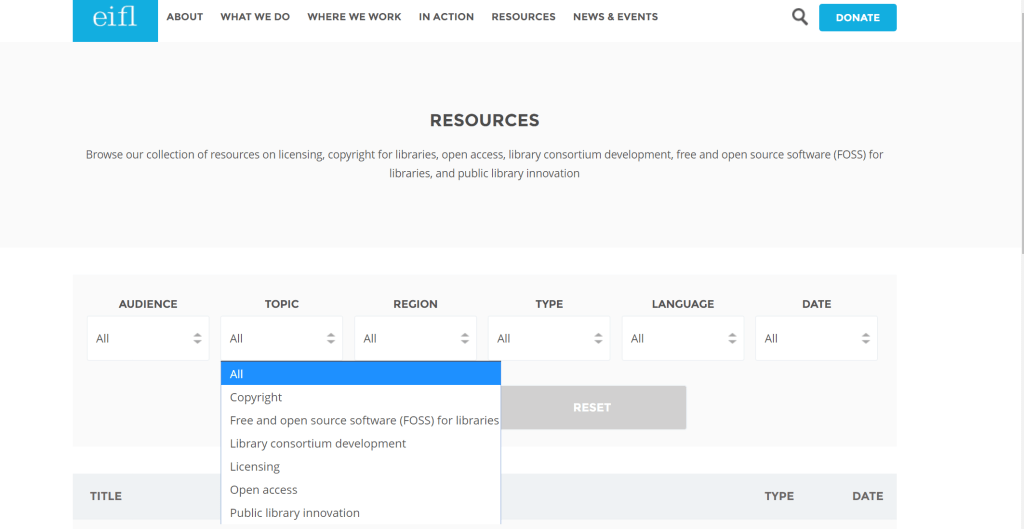
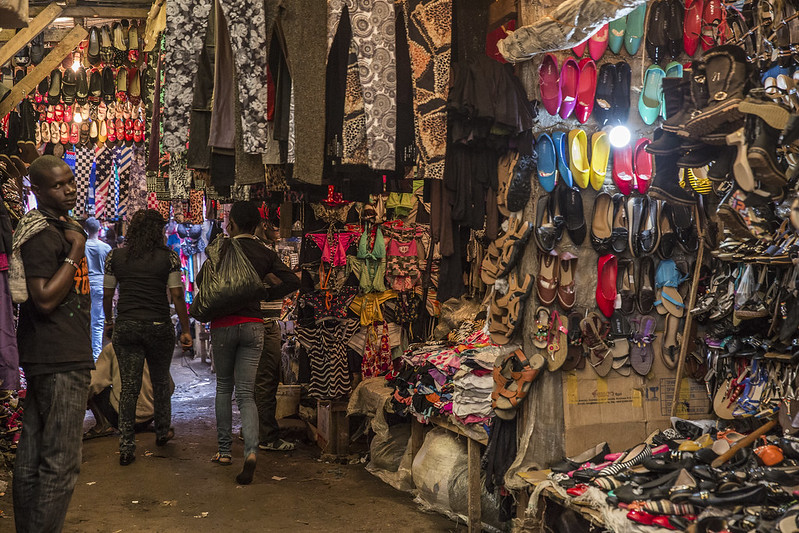
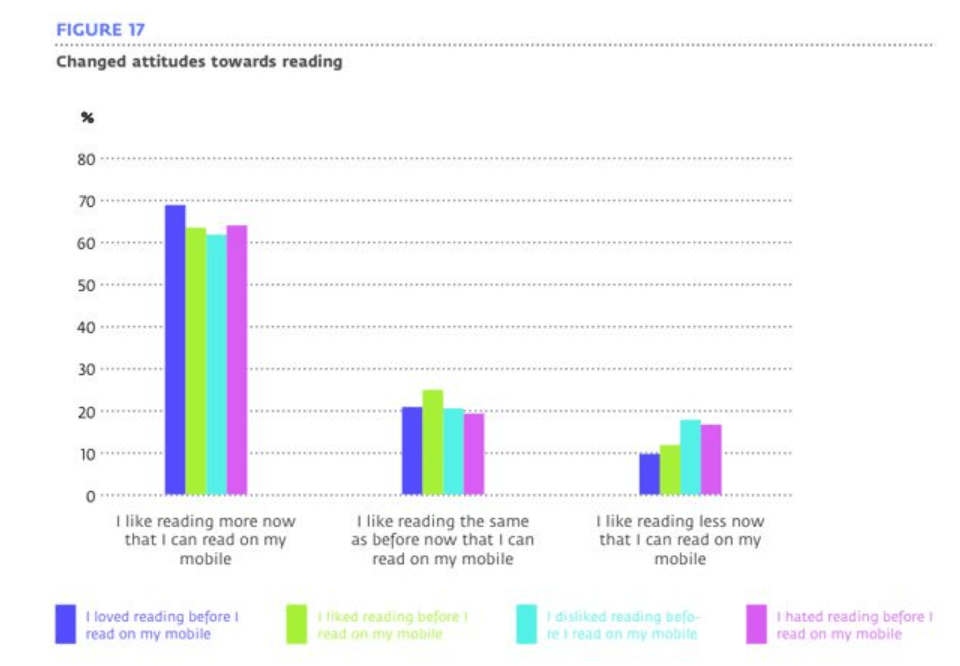
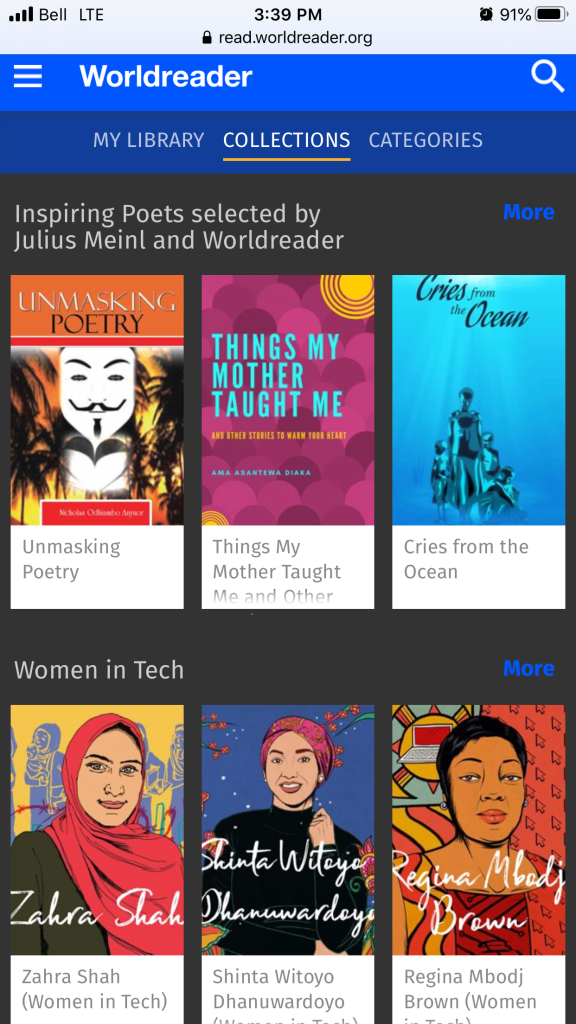
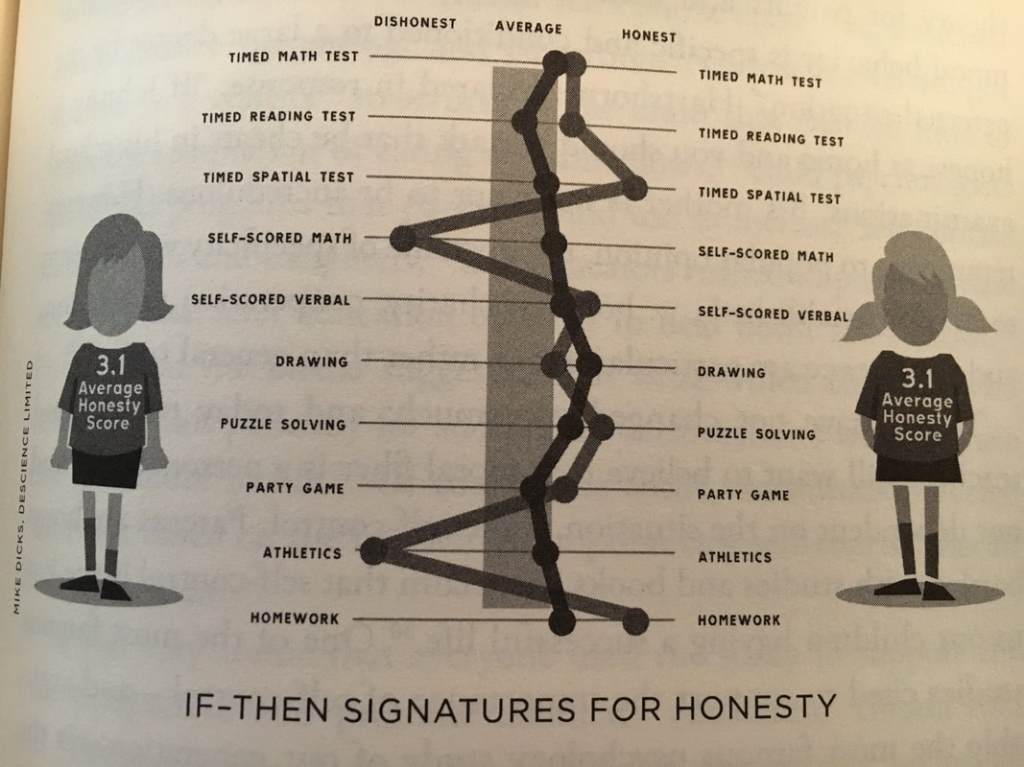
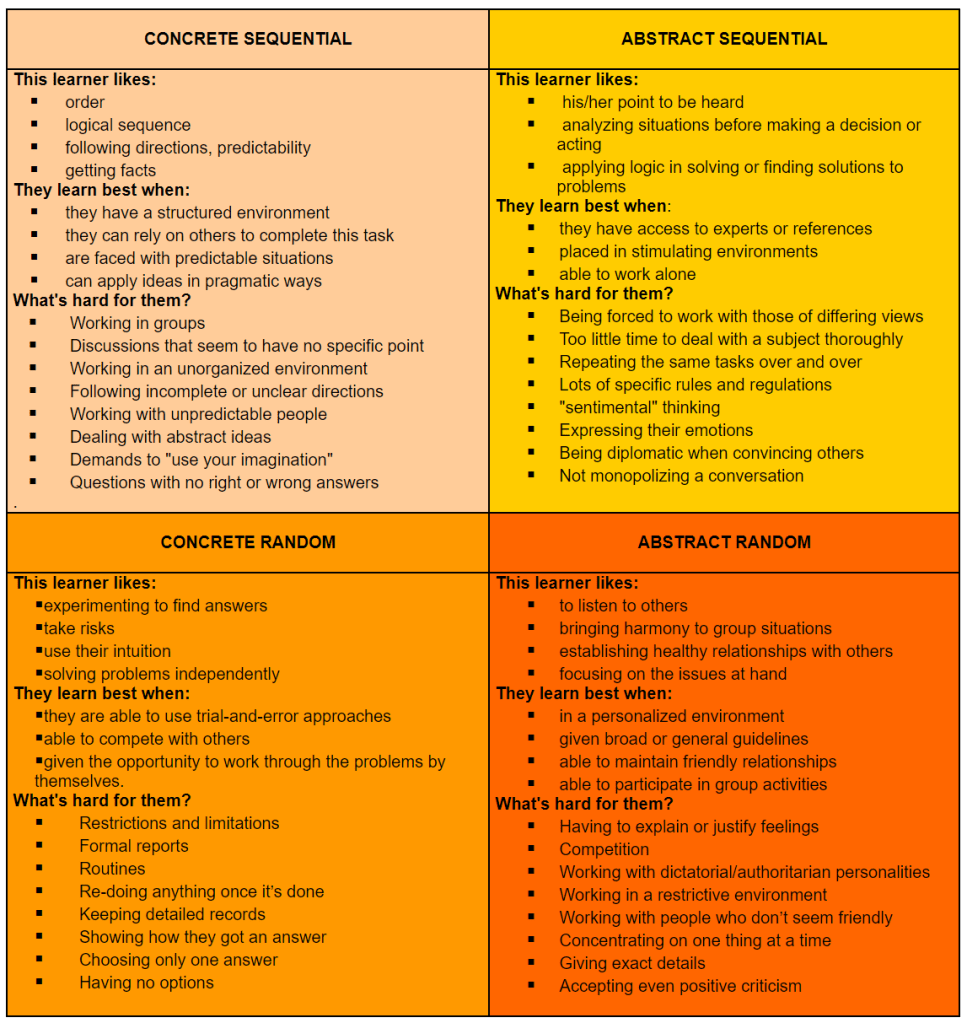
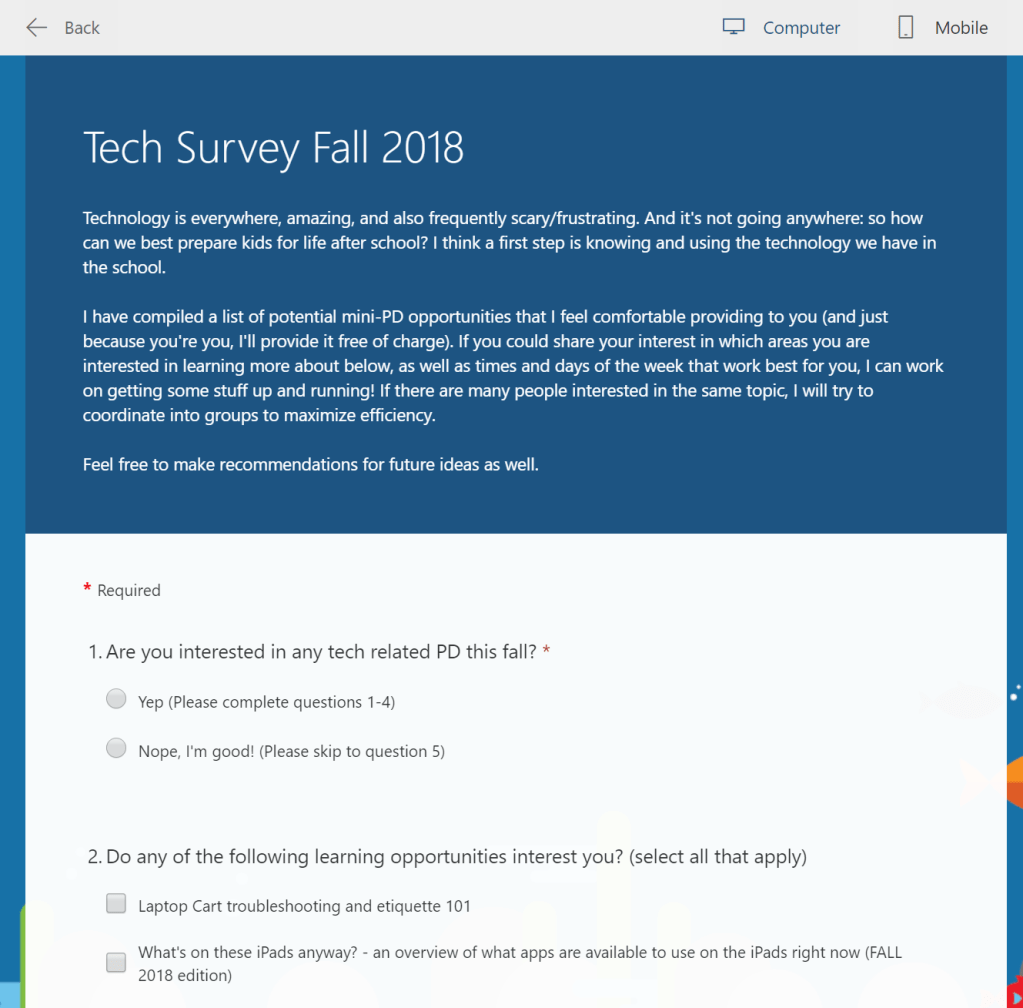
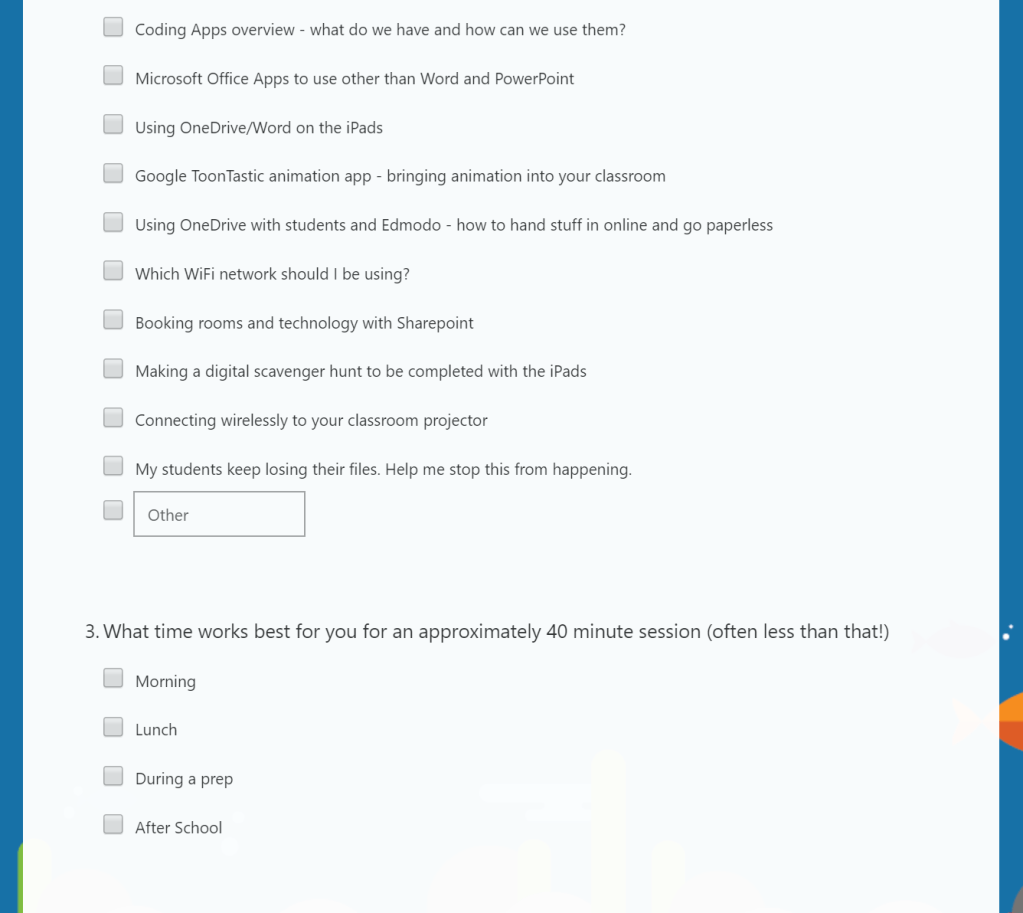
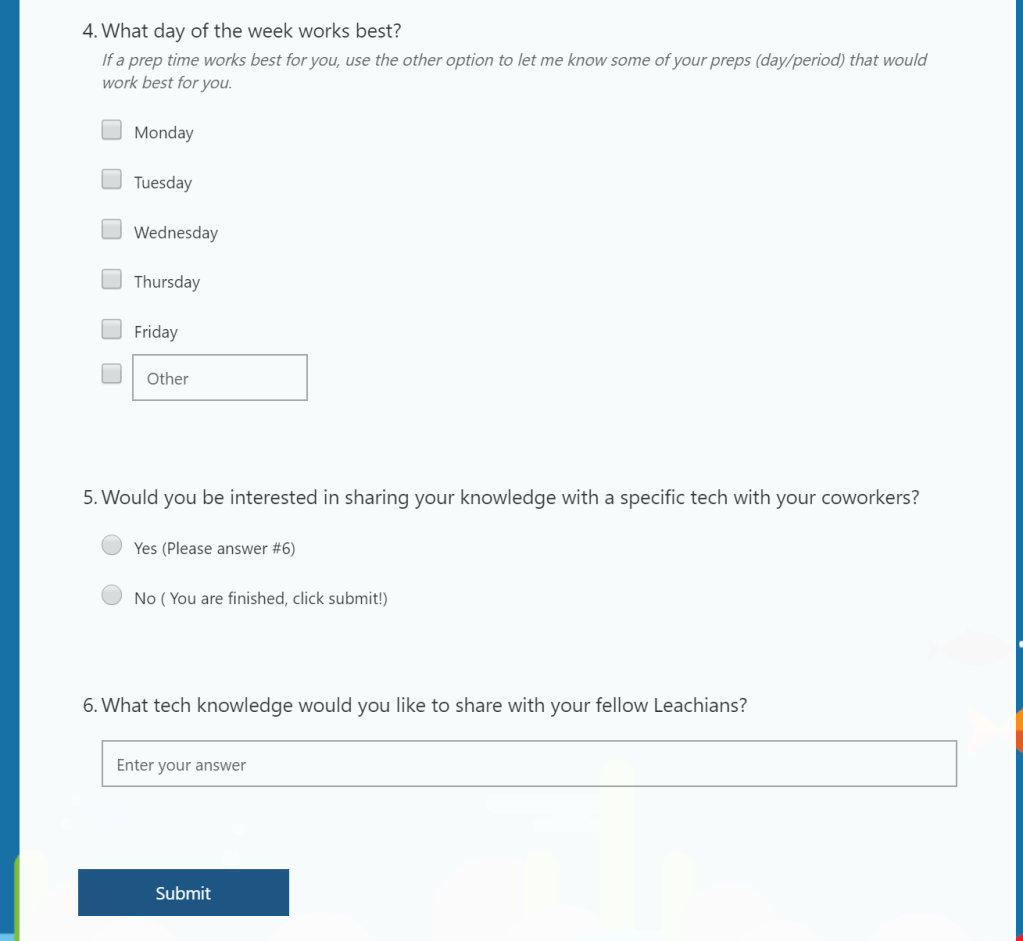
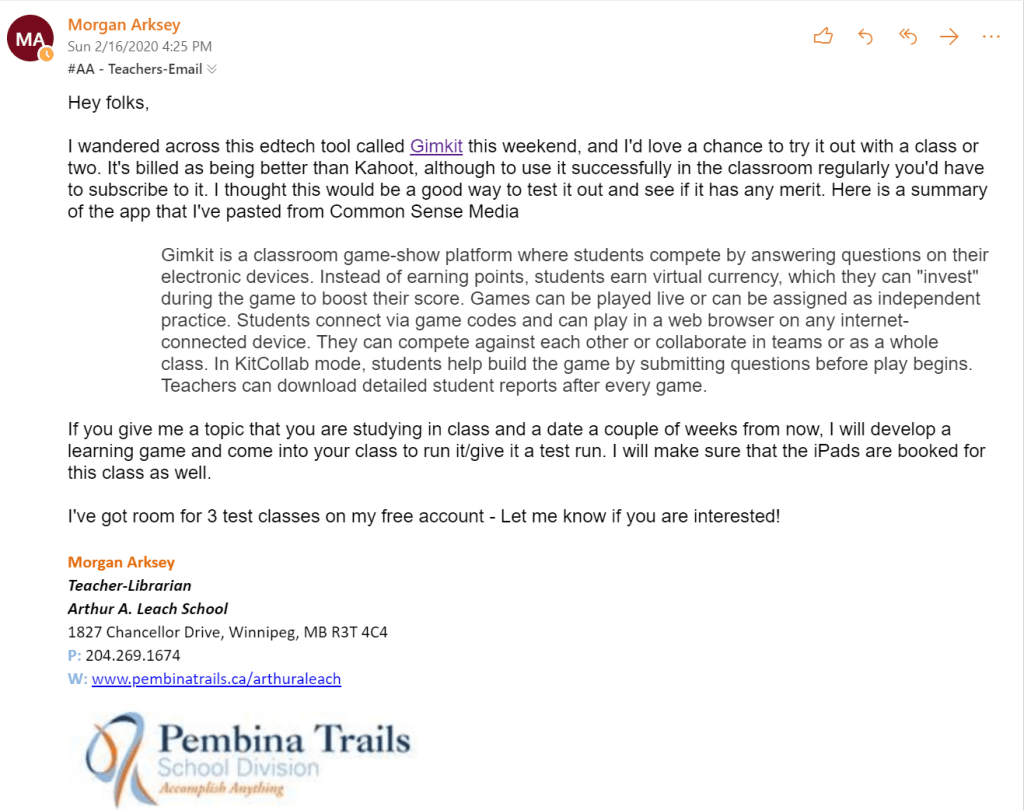
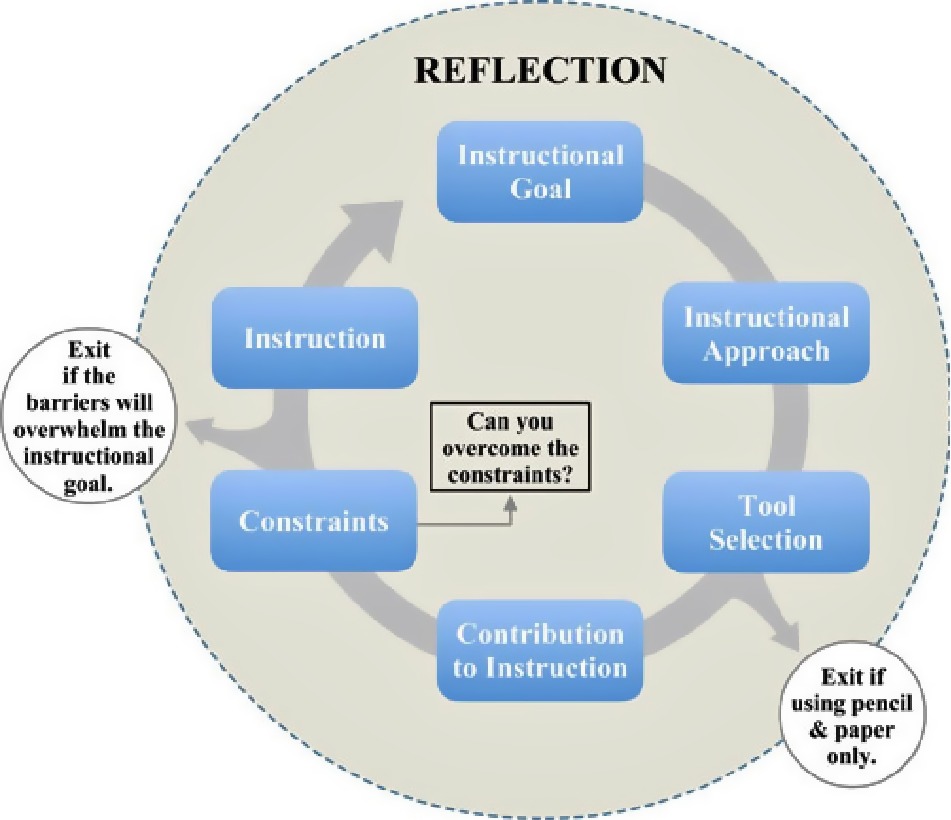
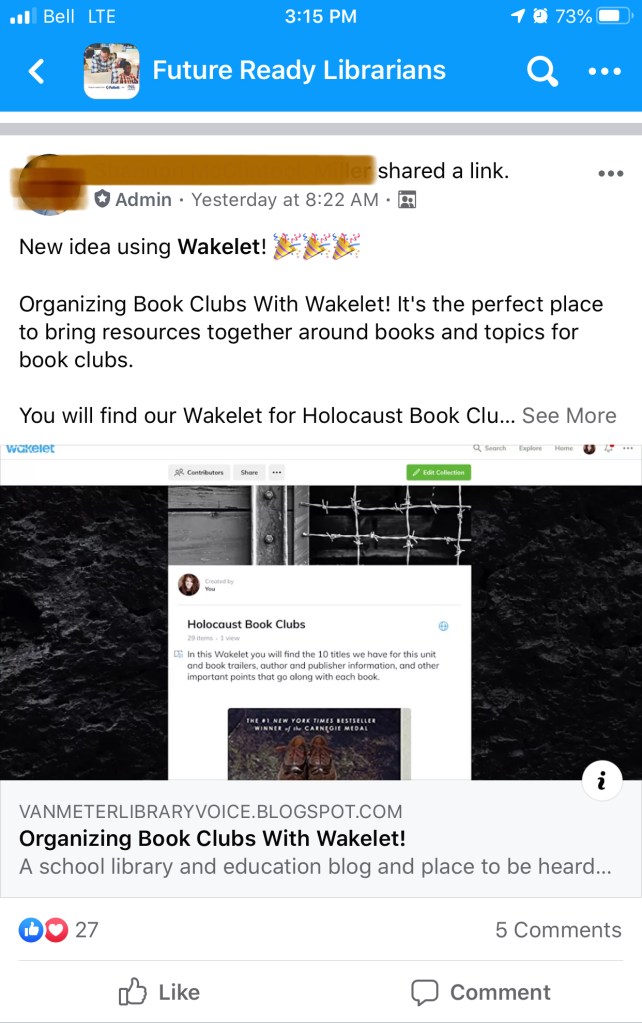
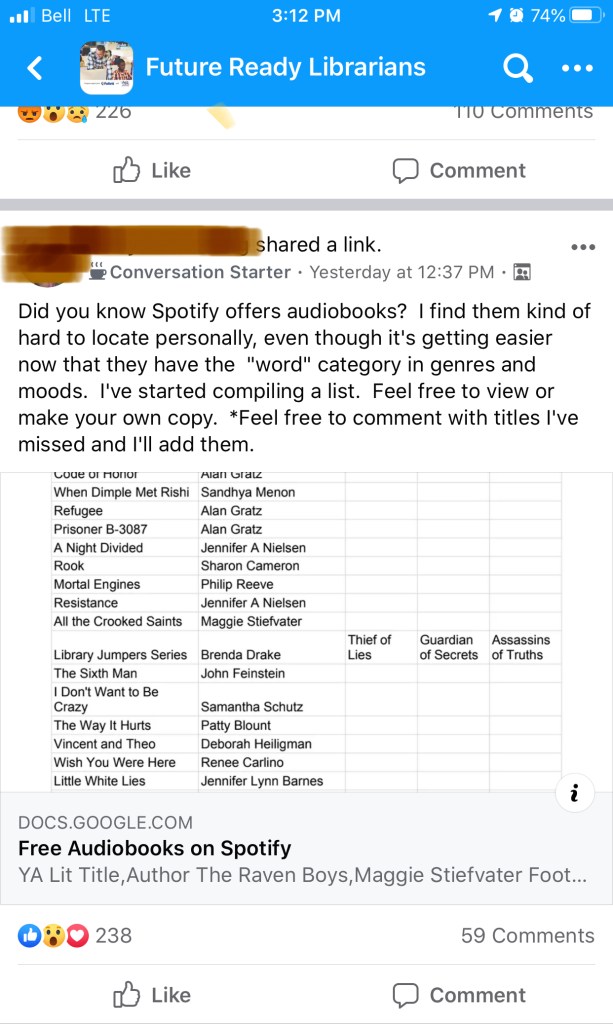
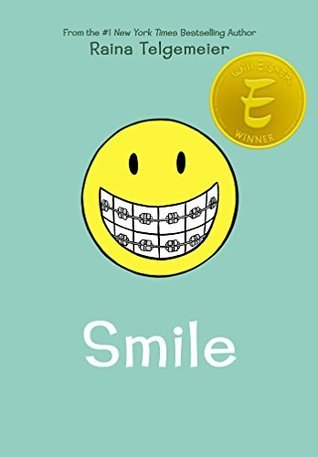
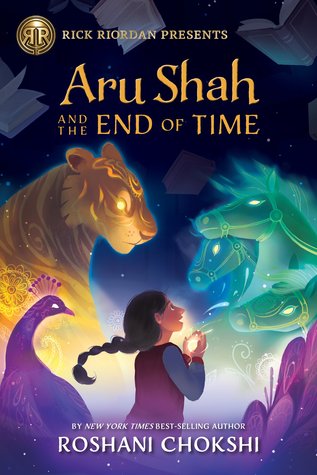


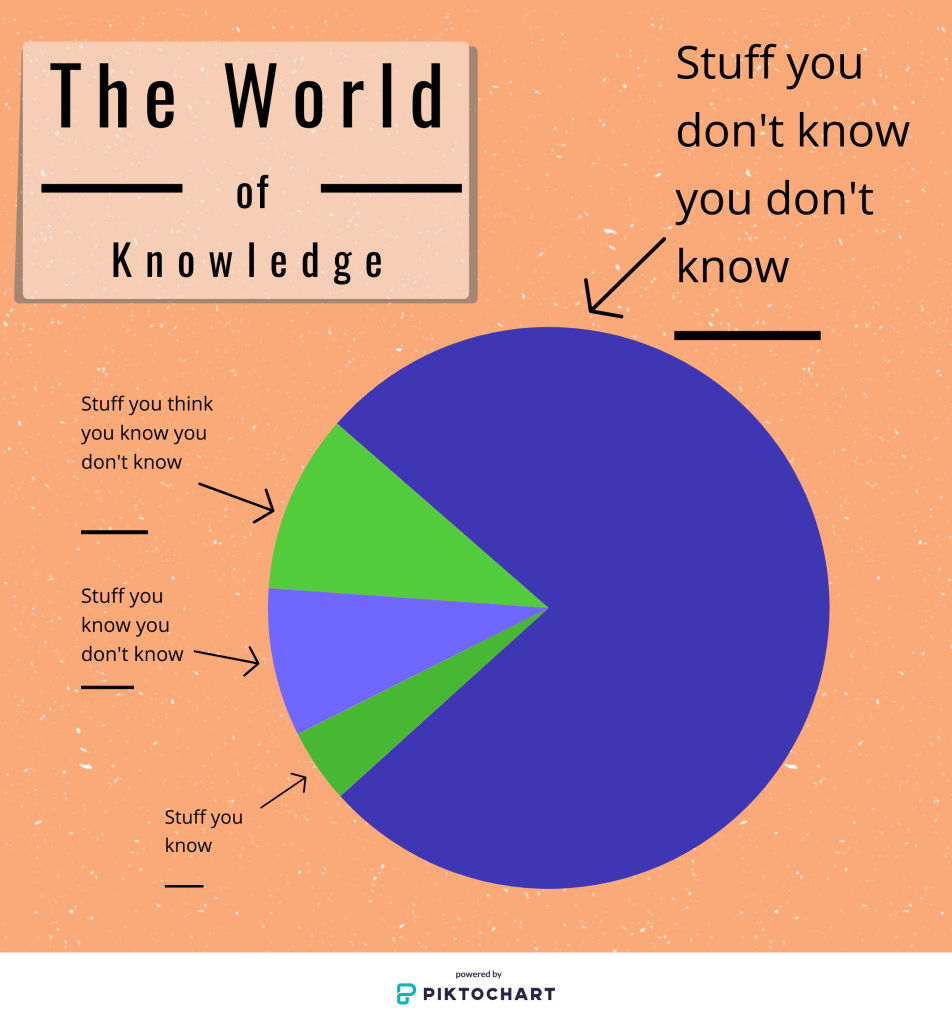
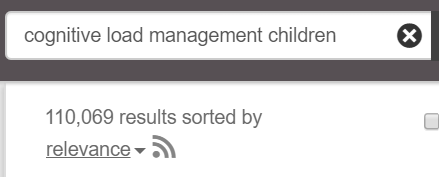
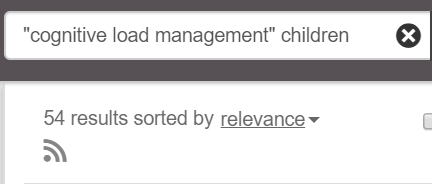
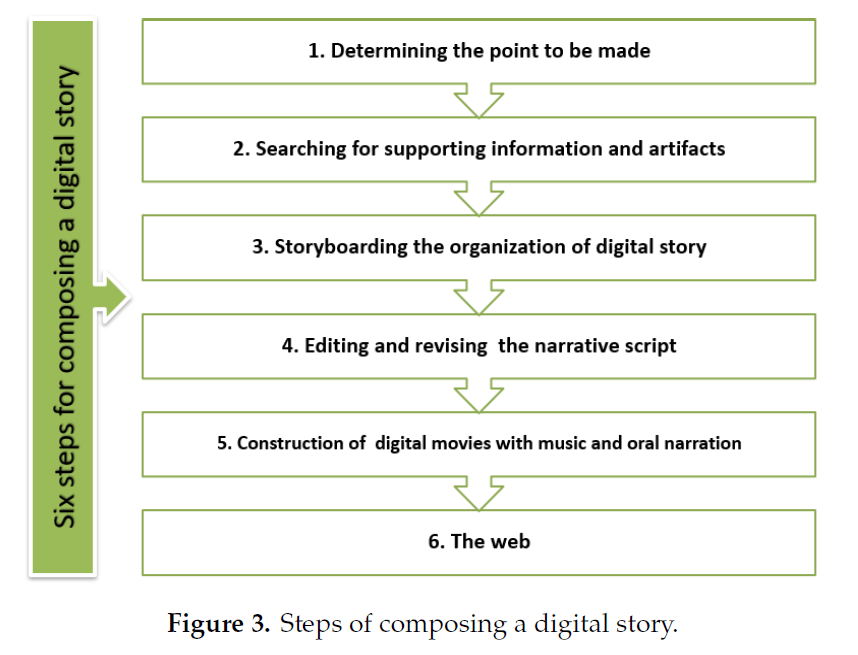
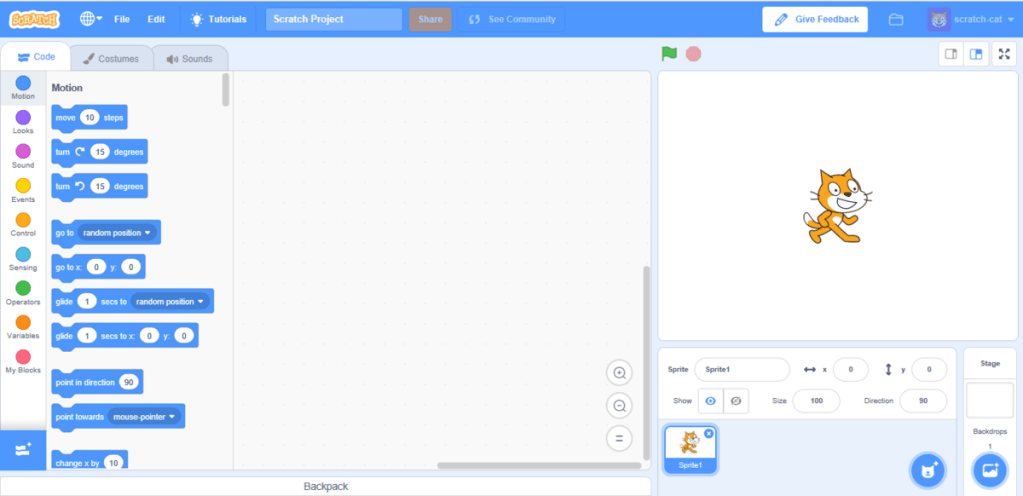
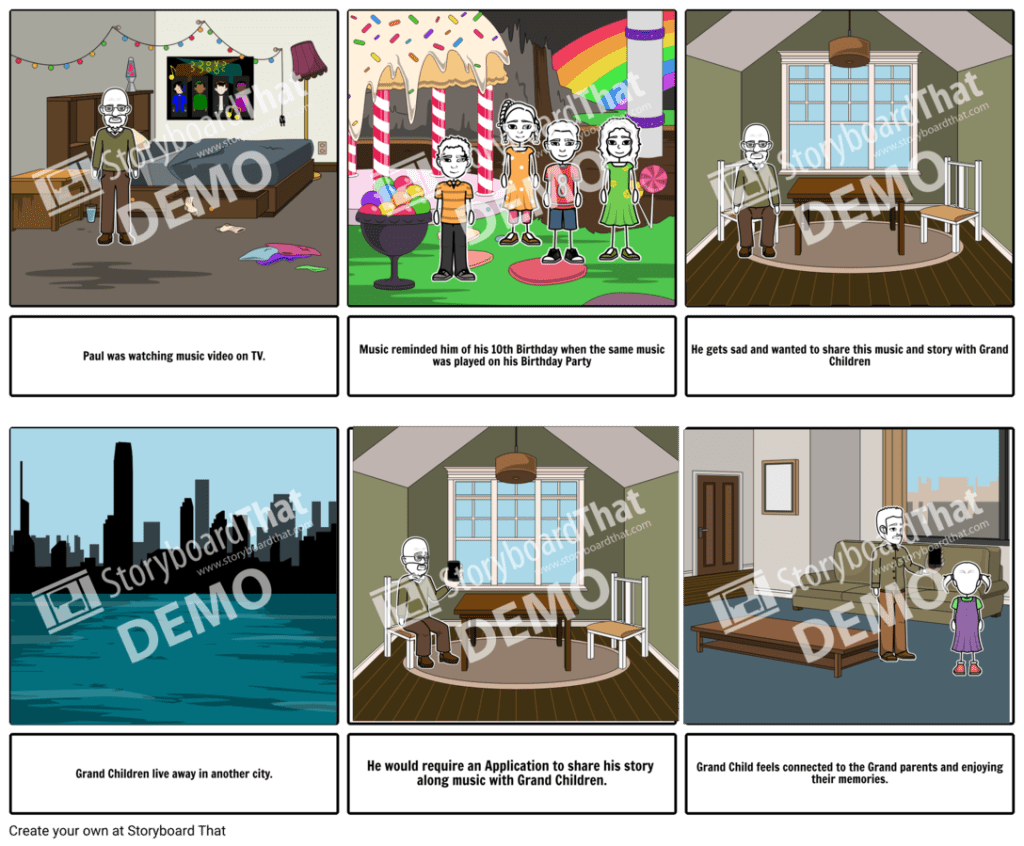
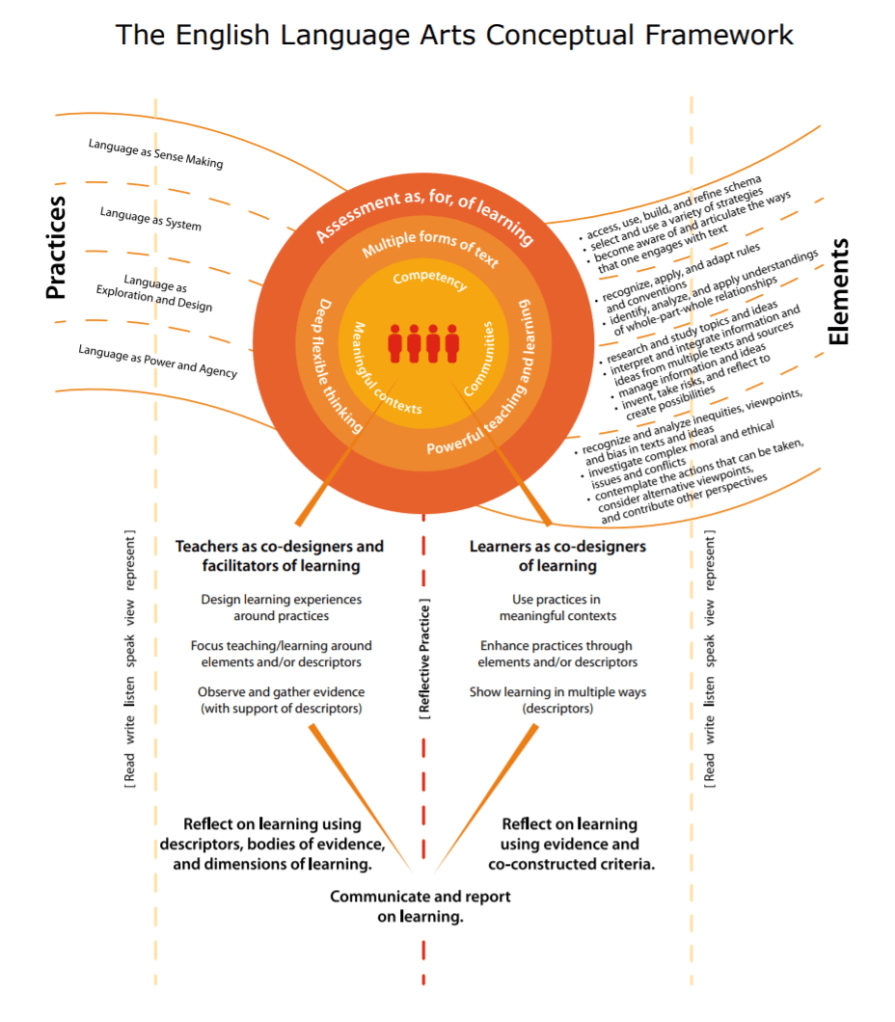
 themarksey blog